Power Apps
Code Apps Are GA: What It Actually Changes for Power Platform Teams
Code Apps hit General Availability on February 5, 2026. Beyond the announcement - what changed, what broke, and why this reshapes how teams build on Power Platform.
On February 5, 2026, Microsoft announced the General Availability of Code Apps in Power Apps. The feature had been in preview since mid-2025, but GA changes the calculus: production support, CSP enforcement, connection references for ALM, and a clear signal that Power Platform now officially welcomes pro-developers.
This is not a getting-started tutorial: the Code Apps series covers that. This article examines what GA actually changes for teams building on Power Platform, what broke along the way, and where this is heading.
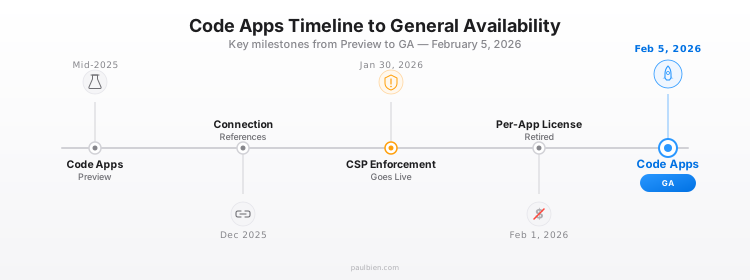
What changed from preview to GA
The GA milestone was not just a label change. Several capabilities shipped alongside or just before the announcement.
Connection references (PAC CLI v1.51.1)
This was the blocker for enterprise adoption. In preview, Code Apps used direct connections, meaning solutions could not be portably imported across environments. A connection created in Dev would not map to the equivalent in Production.
With connection references, Code Apps now participate in standard Power Platform ALM. Export a managed solution from Dev, import it into Prod, and remap connections at import time, just like canvas apps and flows.
# Connection references are now supported in add-data-source
pac code add-data-source \
  -a "shared_office365users" \
  -c "<connection-reference-id>"
CSP enforcement (January 30, 2026)
Content Security Policy enforcement went live five days before the GA announcement. Every Code App that called an external API, loaded a CDN font, or embedded an iframe from a third-party domain broke silently unless the domain had been allowlisted.
The recommended approach:
- Enable CSP in report-only mode first
- Deploy the Code App and review the browser console for violation reports
- Add the necessary domains to the allowlist
- Switch to enforcement mode
External APIs, CDN domains (Google Fonts, unpkg, cdnjs), and embedded iframes all need explicit approval.
SharePoint CRUD operations
Code Apps can now perform full CRUD operations on SharePoint lists, including support for complex column types: Choice, People, and Lookup columns. This was a gap in the preview that blocked several common use cases.
npm-based CLI (preview)
A new npm-based CLI is included in SDK v1.0.4+. It reduces prerequisites: no more dotnet dependency for running pac code commands. Still in preview, but it signals where Microsoft is heading: pure web tooling, no .NET required.
# The npm CLI alternative (preview)
npx @microsoft/power-apps code init --displayname "My App"
The pac code commands will eventually be deprecated in favor of this npm-native approach.
Code Apps vs. everything else
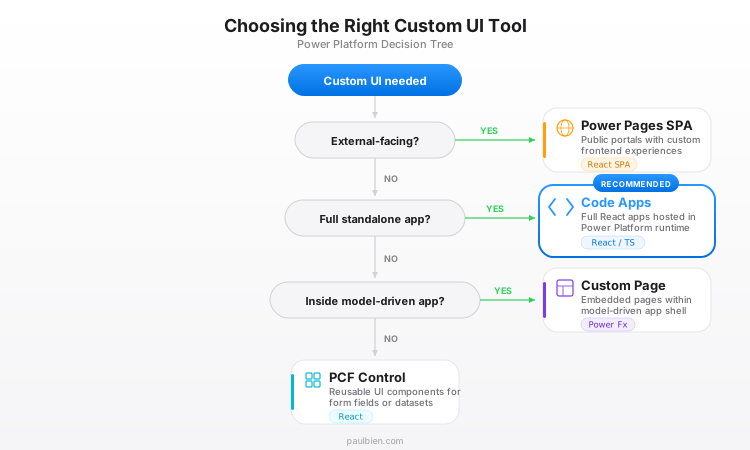
Power Platform now has multiple ways to build custom UI. Understanding when to use which one prevents teams from picking the wrong tool.
| Code Apps | PCF Controls | Custom Pages | Power Pages SPA | |
|---|---|---|---|---|
| What it is | Standalone React/TS app | Reusable UI component | Canvas-like page in MDA | External-facing website |
| Audience | Internal users | Embedded in any app | Model-driven app users | External users (portals) |
| Framework | React, Vue, any | React, TypeScript | Power Fx (low-code) | React (SPA model) |
| Data access | 1,500+ connectors via SDK | Bound to field/dataset | 600+ connectors | Dataverse + Web API |
| Auth | Handled by Power Platform | Inherits from host app | Inherits from host app | Power Pages auth |
| Mobile | Browser only | Via host app | Via host app | Browser-based |
| Routing | Client-side (React Router) | N/A (component) | N/A (single page) | Client-side SPA |
The decision framework:
- Full standalone internal app with complex UI? → Code Apps
- Reusable component inside an existing app? → PCF control
- Lightweight page inside a model-driven app? → Custom Page
- External-facing portal? → Power Pages SPA
Code Apps fill a gap that did not have a clean answer before: the full-page, custom React application that still lives inside Power Platform governance.
The low-code / pro-code convergence
At PPCC25 in October 2025, Charles Lamanna (President, Business & Industry Copilot at Microsoft) declared: "Low code as we know it is dead."
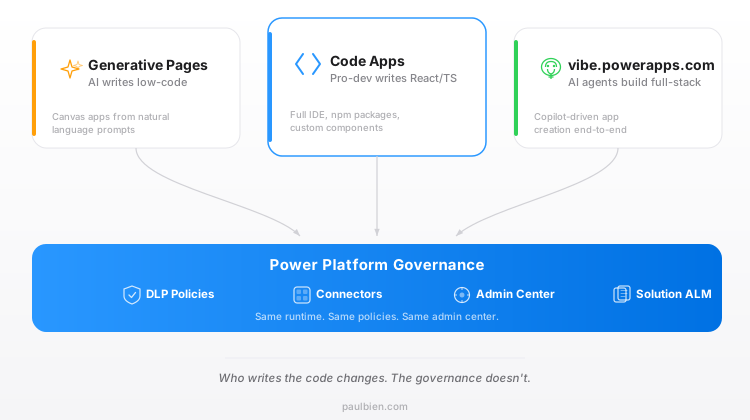
That statement was not about abandoning citizen developers. It was about the convergence happening across three new paradigms:
Generative Pages: AI generates model-driven app pages from natural language prompts. Still low-code, but the "code" is written by AI.
Code Apps: Full React/TypeScript/Vue applications built in VS Code, deployed to Power Platform. The developer writes real code, but Power Platform handles auth, hosting, connectors, and governance.
vibe.powerapps.com: AI agents generate full-stack React + Dataverse applications from natural language descriptions. The output is a Code App, meaning vibe.powerapps.com is not a replacement for Code Apps but a complementary on-ramp that generates them.
The pattern: all three paradigms produce governed Power Platform assets. The difference is who writes the code: a citizen developer, a professional developer, or an AI agent. The runtime and governance layer are the same.
For organizations, the old "low-code team vs. pro-code team" split becomes less relevant. Both teams ship to the same platform, under the same DLP policies, with the same connector catalog, monitored by the same admin center.
Real-world patterns emerging
One month after GA, the community is already shipping production Code Apps:
Model-Driven App replacement: Code_Outlook by Clement Olivier (Microsoft MVP) rebuilds the full Outlook calendar experience as a Code App embedded in Dynamics 365. Multi-calendar support, CRUD on appointments, category colors, all through the Office 365 Outlook connector, zero Dataverse sync. The bundle is 924KB minified.
Enterprise templates: MDATemplate-PowerPlatform provides a full model-driven app experience rebuilt in React + Fluent UI + Dataverse. Entity grids, record forms, business process flow components, all as reusable React components.
Vibe-coded Code Apps: Multiple community members have tested AI-assisted Code App development, using AI tools to generate React components that target the Power Apps SDK. The workflow: describe the app in natural language, generate the React code, wire up connectors via pac code add-data-source, deploy with pac code push.
What still does not work
GA does not mean complete. Several limitations remain:
-
No mobile support. Code Apps run in desktop browsers only. No Power Apps mobile app support, no offline capability.
-
No Git integration. Power Platform source control (Pipelines, Git sync) does not cover Code Apps. Version control must be managed externally.
-
Standalone only. Code Apps cannot be embedded as components inside canvas apps, model-driven apps (except via iframe workaround), or Power Pages.
-
No schema refresh. When a Dataverse table schema changes, there is no
pac code refresh-data-sourcecommand. Workaround: delete and re-add the data source. -
Vue.js support is theoretical. Microsoft mentions Vue as supported, but no official Vue template exists yet.
What this means for your team
Power Platform admins: Code Apps introduce a new surface to govern. The good news: they are first-class Power Platform assets. DLP policies apply, environment isolation works, connector usage is tracked. The new responsibility: CSP policy management.
Pro-developers: Code Apps remove the main objection. The development experience is React + TypeScript + Vite in VS Code: no Power Apps Studio, no Power Fx. The trade-off: no server-side logic, no custom backend, browser-only deployment.
Citizen developers: Nothing changes short-term. Canvas apps and Power Fx are not going away. But Code Apps create a path for handing off complex requirements to pro-dev teammates without leaving the platform.
Licensing: Code Apps require Power Apps Premium ($20/user/month). The per-app license ($5/user/app/month) was retired February 1, 2026. For small deployments, Pay-As-You-Go ($10/active user/app/month via Azure) may be more cost-effective. The Developer Plan (free) covers development and testing.
Looking ahead
Three signals point to where Microsoft is heading:
-
The npm CLI replacing PAC CLI for Code Apps: removing the .NET dependency and aligning with standard web developer tooling.
-
vibe.powerapps.com generating Code Apps: making AI the primary app builder, with Code Apps as the runtime target.
-
Power Apps MCP Server: exposing app capabilities to AI agents, enabling agents to interact with Power Apps for form completion, data exploration, and human-in-the-loop workflows.
The direction is clear: Power Platform is becoming a runtime and governance layer that accepts code from humans, AI, and agents alike. Code Apps are the first concrete implementation of that vision.
Sources:
- Generally Available: Host and Run Code Apps in Power Apps - Microsoft Power Apps Blog
- Code Apps Overview - Microsoft Learn
- PAC CLI v1.51.1 Release Notes - GitHub
- Content Security Policy Configuration - Microsoft Learn
- npm CLI Quickstart (Preview) - Microsoft Learn
- Inside the New Power Apps: The Future of App Development - Microsoft Blog
- Code_Outlook Repository - Clement Olivier (Microsoft MVP)
- MDATemplate-PowerPlatform - Daniel Kerridge
- Power Apps Pricing - Microsoft