Power Automate
The Automation Canvas Is Moving: Copilot Studio Workflows vs Power Automate
Microsoft is pulling the automation canvas into Copilot Studio. One email-approval flow, built twice, exposes the real gap: the stored artefact is identical, but the new Workflows designer is UI-only in preview while the Power Automate twin imports in about 30 seconds.
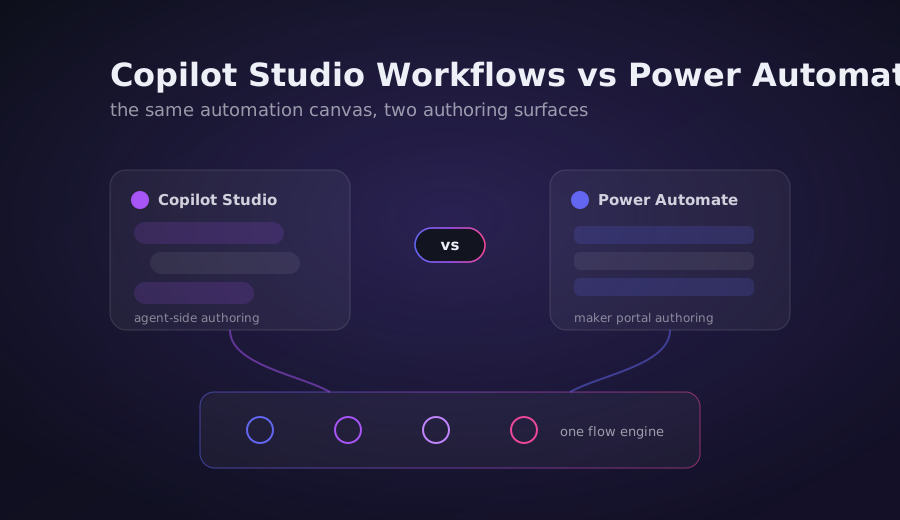
Microsoft Is Moving the Automation Canvas
For a decade, building automation on the Power Platform meant one place: Power Automate. That is changing. Copilot Studio now ships its own automation surface, the new Workflows experience, a revamped visual designer with node-level testing and native AI actions. The pitch is clean: build your automations where your agents already live.
The interesting question is not whether the new designer looks nicer. It is what happens underneath, and what a pro-dev or an ALM pipeline can actually do with it today. So the honest way to answer is to build the same thing twice and measure both sides.
The scenario: a single email-approval flow. A request comes in, an approver is asked to approve or reject, and the requester gets an email either way. Four logical steps. Built once in classic Power Automate, once in the new Copilot Studio Workflows designer, on the same development tenant.
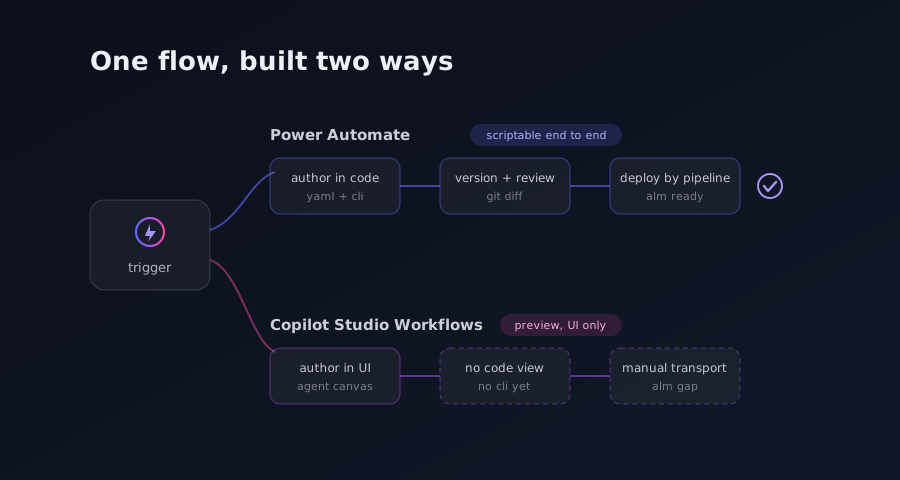
The Power Automate Side: Scriptable End to End
The Power Automate build is the reference because it is a fully solved path. The flow is a manual trigger with four inputs (Requester, Approver, RequestTitle, RequestDetails), a Start and wait for an approval action, a Condition on the approval outcome, and two Send an email branches for the approved and rejected cases.
Here is what that build measured:
| Metric | Value |
|---|---|
| Trigger + actions | 1 trigger, 4 actions |
| Flow definition JSON | 110 lines |
| Connection references | 2 (Approvals, Office 365 Outlook) |
| Solution package size | 3,217 bytes |
| Pack time | under 2 seconds |
pac solution import time | about 30 seconds |
| Import result | Solution imported successfully |
The entire flow was hand-crafted as JSON, packed into a solution, and imported through pac solution import. No clicking in a designer. After import, a query against the Dataverse Web API confirmed the flow landed as a single workflow row with category=5 (Modern Flow), in draft state, exactly as expected before its connection references are bound.
The takeaway: Power Automate automation is scriptable from definition to deployment. JSON to solution package to import, proven live in about 30 seconds. That is the bar the new experience has to clear.
The Copilot Studio Side: The Same Artefact, a Different Wall
Here is the finding that makes this comparison worth writing. When you look at where a Copilot Studio Workflow is actually stored, it is not a new kind of object. Both the older agent-flow format and the new Workflows format persist into the same standard workflow Dataverse table, as category=5, type=1, with the flow body in the clientdata column. The Power Automate reference flow lands in that exact same table, as the exact same category.
In other words, the stored artefact is identical in shape. A Workflow is an ordinary Dataverse workflow row, attached to an agent through the botcomponent_workflow many-to-many relationship. There is no separate component type that represents the flow body; the body lives in the workflow table and is referenced by the agent. That means a Copilot Studio Workflow is, in principle, transportable by the exact same solution package mechanism used on the Power Automate side.
So if the storage is identical and it is solution-transportable, where is the gap?
The gap is authoring. The new Workflows designer is UI-only in public preview.
- Creation is exclusively a click-path: Workflows, then New workflow, then add a trigger and build in the designer. There is no documented API or CLI create path, and none exists in
pac. - The
pac copilotcommand surface operates on a whole agent only. It can list, extract a template, clone a whole bot from a template, and publish. No verb authors an individual Workflow.pac solution import/export/clonemoves the container; it does not build the flow inside it. - Editing means opening the workflow in the designer's Build tab. There is no headless edit path.
- Microsoft's own documentation repeats, on every page of the new experience, that agents and workflows created in the new experience cannot be converted to the classic experience. There is no downgrade or interop fallback.
- ALM out of the designer is solution export and import only, and even then the required components have to be added inside the UI. The authoring never leaves the Copilot Studio canvas.
What This Means for ALM and Pro-Dev Today
If your automation practice depends on source-controlled flow definitions, code review of the JSON, and scripted deployment, the new experience does not fit that shape yet. You can move a finished Workflow between environments in a solution, but you cannot generate or diff its body outside the designer. Every meaningful change to the automation goes through a human in the Copilot Studio canvas.
That is a real constraint for teams that have invested in pipelines. The transportability is genuine and useful, so an approved Workflow can travel through your environments. But the create-and-edit loop is manual, and there is no bridge back to the classic designer if you decide the new experience does not suit a given flow.
For a maker building inside an agent, none of this matters much: the designer is where you want to be anyway, and the native AI actions, a Define Variables node that groups several operations, and node-level testing are genuine improvements over stitching connectors together. The tension is specifically between the new canvas and the automated, scripted world that classic Power Automate has spent years enabling.
Billing Works Differently Too
There is a second difference that will surface on the invoice, not in the designer. Copilot Studio Workflows consume Copilot Studio capacity for each action they execute. Every action a Workflow runs bills against prepaid Copilot Studio capacity, and once that capacity is exhausted, new runs are blocked.
Two exemptions matter. Test runs from inside the designer do not consume capacity, so iterating on a build is free. And users licensed for Microsoft 365 Copilot are exempt for their own runs. But the model is fundamentally different from Power Automate's per-flow or seeded licensing. If you are used to reasoning about automation cost in terms of flows and seats, the new experience asks you to reason in terms of actions executed against a capacity pool that can run dry and stop your automations.
Verdict: A Preview, Not a Verdict
The honest read is that this is a preview, and previews are snapshots, not destinations. The new Workflows experience is explicitly not for production, and its functionality is restricted while it matures.
What the comparison establishes today is specific and measurable. The stored artefact is the same category-5 Dataverse workflow on both sides, and it is solution-transportable either way. Power Automate remains fully scriptable, from a JSON definition through a solution package to an import that completed in about 30 seconds. The new Copilot Studio designer is UI-only for authoring, with no API, no CLI, and no path back to the classic designer, and it bills per action against Copilot Studio capacity.
None of that is a criticism of the direction. Pulling automation into Copilot Studio, next to the agents it serves, is a coherent move, and the designer itself is a step forward for makers. The gap to watch is the scripting surface. When the new experience gains an authoring API and a real ALM story, the pro-dev world catches up with the canvas. Until then, the right posture is to know exactly which side of the line each of your flows sits on, and to re-check the whole comparison at general availability, because everything above is measured against a public preview and preview is not final.