Power Apps
What Are Code Apps? The Third Type of Power App
Power Apps Code Apps are now GA. Here's what they are, how they compare to Canvas and Model-Driven apps, and why they matter for pro developers.
On February 5, 2026, Microsoft made Code Apps generally available in Power Apps. This is the third application type, after Canvas Apps and Model-Driven Apps, and it fundamentally changes what professional developers can build on Power Platform.
The problem Code Apps solve
Canvas Apps are great for citizen developers. Model-Driven Apps are great for data-centric CRUD applications. But neither gives professional developers what they actually want: full control over the UI with their own frameworks and tools.
Until now, building a custom React application that integrates with Dataverse meant handling OAuth flows, managing token refresh, configuring API endpoints, and wrestling with authentication middleware. Code Apps eliminate all of that.
What you get
With Code Apps, you write a standard React/TypeScript SPA in VS Code. The Power Apps SDK handles everything else:
- Authentication: Entra ID SSO, zero auth code
- Connectors: 1,500+ typed connectors (Dataverse, Office 365, SharePoint, SQL Server, custom)
- Governance: DLP policies, Conditional Access, app quarantine, sharing limits
- Hosting: Managed HTTPS endpoint, no infrastructure to maintain
Your code calls typed TypeScript service methods generated by the CLI. The SDK routes connector calls through Power Platform's managed runtime. You focus on the UI.
How Code Apps compare
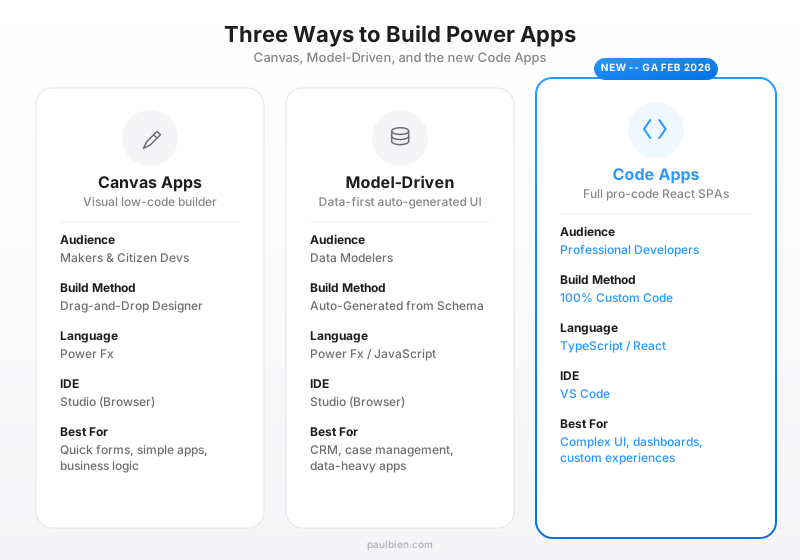
The development workflow in 30 seconds
# Scaffold from the official template
npx degit github:microsoft/PowerAppsCodeApps/templates/vite my-app

# Initialize and add data sources
pac code init --displayName "My App"
pac code add-data-source --apiId /providers/Microsoft.PowerApps/apis/shared_commondataservice --table account

# Develop locally with hot reload
pac code run    # Terminal 1: auth middleware
npm run dev     # Terminal 2: Vite dev server

# Deploy to Power Platform
npm run build && pac code push
That is it. From scaffold to deployed app.
Why this matters
Code Apps are not just another feature. At Microsoft Ignite 2025, the new Vibe Power Apps experience, which generates apps from natural language, produces Code Apps as its output. Microsoft is building the future of Power Platform on this foundation.
For professional developers, this means you can finally bring your React skills, component libraries, and architectural patterns into Power Platform without compromise. For Power Platform teams, it means having an escape hatch when low-code reaches its limits.
What to know before starting
A few critical things to be aware of:
- React 18 or 19: the official template uses React 19, both versions are supported
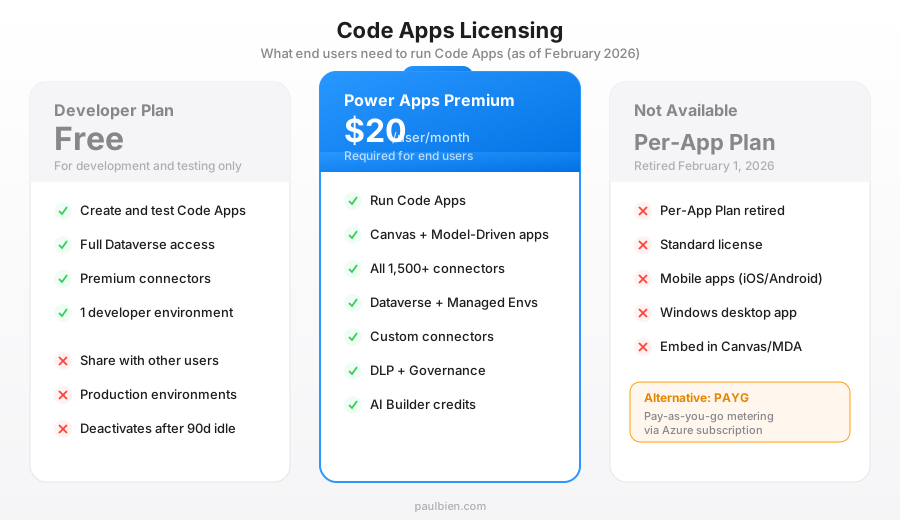
- Premium licensing required: end users need Power Apps Premium ($20/user/month)
- CSP enforcement is active: external APIs must be whitelisted since January 30, 2026
- Standalone only: no embedding in Canvas or Model-Driven apps, no mobile app support
Go deeper
This article is an introduction. For the full picture - architecture diagrams, connector patterns, ALM pipelines, CSP configuration, and production lessons - read the complete guide:
The Complete Guide to Power Apps Code Apps
Sources
- GA Announcement - Ryan Cunningham, Microsoft Power Apps Blog
- Inside the New Power Apps: The Future of App Development - Microsoft (Ignite 2025)
- Code Apps Overview - Microsoft Learn
- Power Apps Code Apps - Rajeev Pentyala