SharePoint
SP MicroApps: one engine, several SharePoint interfaces
When data already lives in SharePoint, an SPFx engine can provide focused interfaces without rebuilding the same foundations for every need.
A familiar pattern in the field: teams already keep their data in SharePoint lists and libraries, but people want to read it, add to it, and edit it in an interface that is easier to use.
A project list can have the right columns and still hide priorities. A request list can be complete but make the next action hard to find.
A document library can hold the right files without making its metadata easy to review and update.
That does not automatically call for a new application. SharePoint already offers views, forms, and formatting; Microsoft documents view formatting here. Power Apps is also a strong option for a low-code process or a SharePoint-connected form, as Microsoft’s integration guidance explains.
SP MicroApps explores a third case: several related experiences need to stay in SharePoint and share part of their behaviour. It does not replace native SharePoint or Power Apps. It is an option when building a limited family of reusable interfaces is worth the engineering work.
| Situation | First option to examine |
|---|---|
| Existing views and forms meet the need | Stay with native SharePoint capabilities |
| A low-code process or form fits the team | Examine Power Apps |
| Related SharePoint experiences should share behaviour | Examine an SPFx engine such as this POC |
That last option has an honest cost: an engine is software to build, deploy, test, and maintain. It reduces repeated work; it does not remove development work.
One common foundation for three demonstrations
SP MicroApps combines a generic web part, controlled configuration, shared data access, and templates bundled in one package. The engine handles loading, errors, configuration validation, data access, and conflict handling. Project Hub and Request Hub also reuse some form components. Each template focuses on presenting a compatible source in a useful way.
The POC demonstrations are named Project Hub, Request Hub, and Document Hub. They were developed to test this same engine with different presentations and sources.
Project Hub
Project Hub starts from a project list with values such as title, status, and progress. It turns them into cards, indicators, search, and filters. An authorised edit returns to that same SharePoint list.
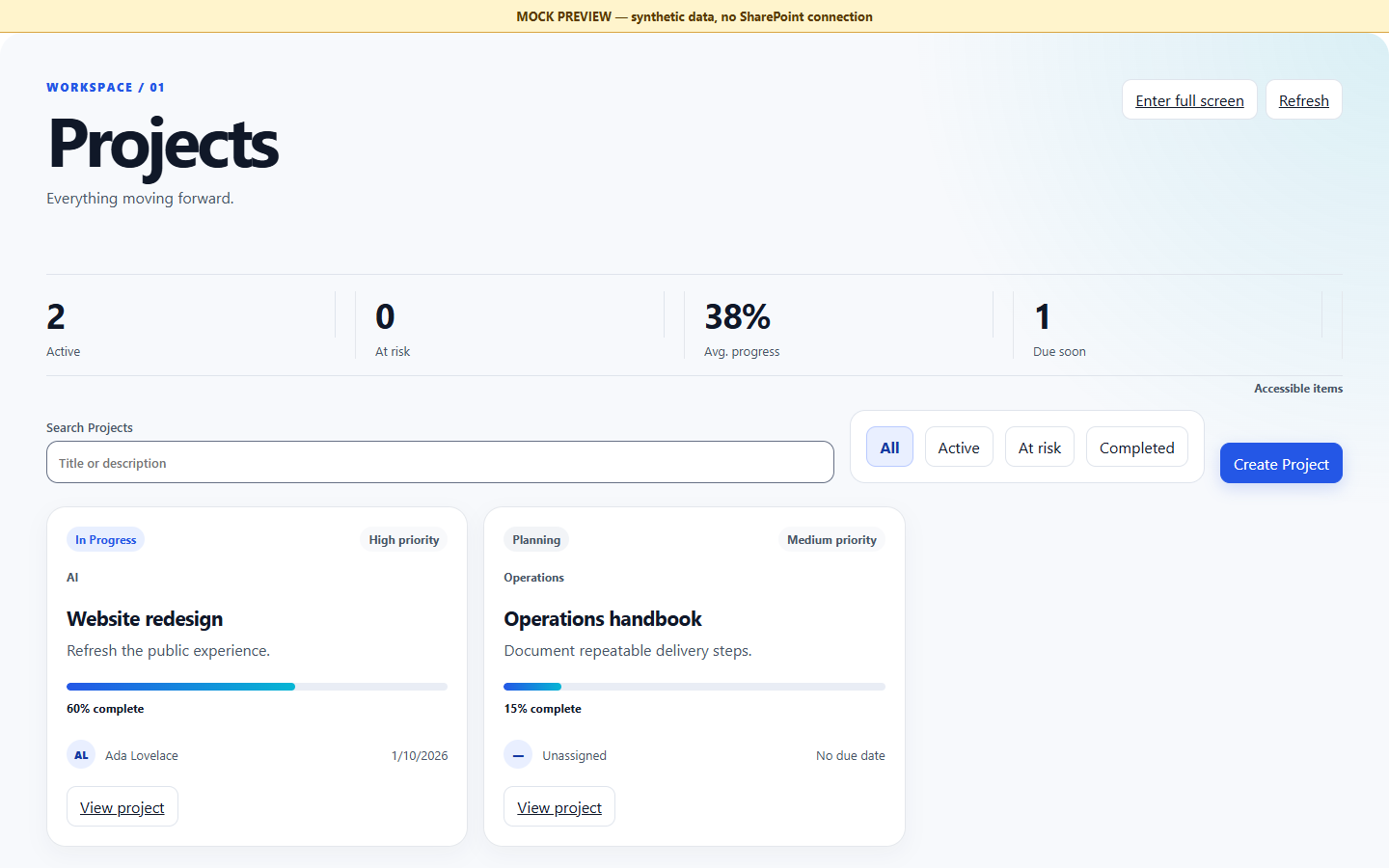
LOCAL MOCK PREVIEW — synthetic data. The capture shows the Project Hub rendering; list access, configuration validation, and loading states remain shared engine behaviour.
Request Hub
Request Hub uses a compatible request source: request type, requester, status, and its expected fields. Its operational list, summaries, filters, and editing journey look different, while the web part, SharePoint access, and configuration protections are shared.
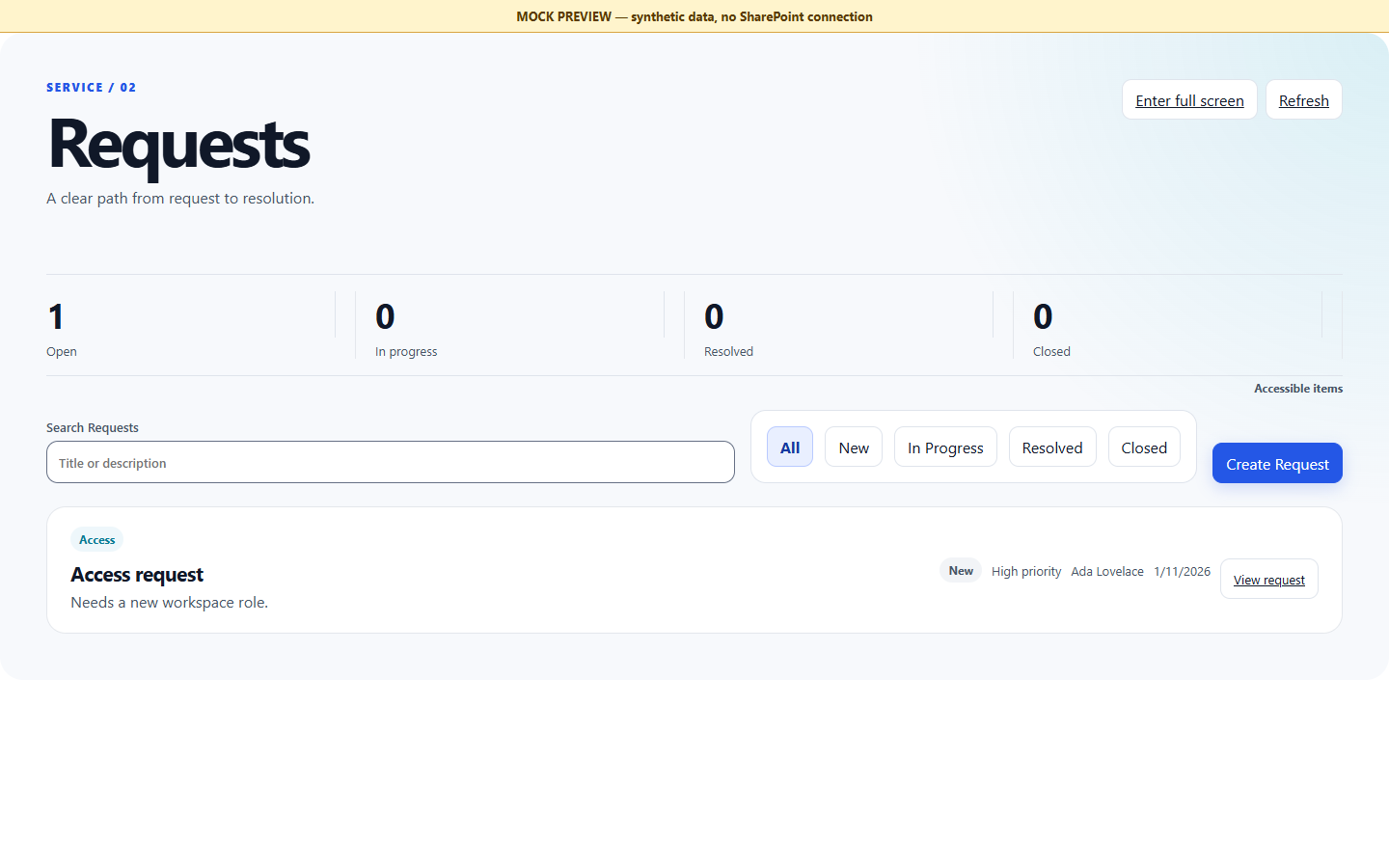
LOCAL MOCK PREVIEW — synthetic data. This illustrates the Request Hub rendering, not a separate application.
Document Hub
Document Hub applies the same pattern to document libraries: find files, read or edit mapped metadata, and, when enabled, upload one file. It supports single-value Person and Lookup fields. It is a focused entry to a SharePoint library, not a full document-management system.
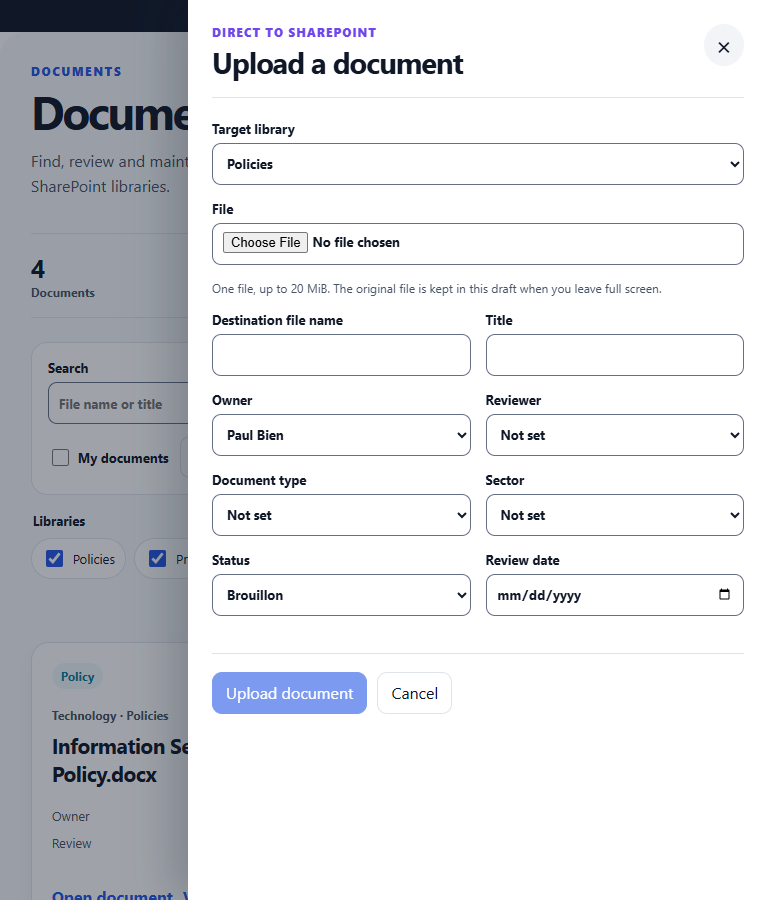
LOCAL MOCK PREVIEW — synthetic data. This illustrates the upload journey; it is not evidence of a live SharePoint integration.
From list data to an interface
Configuration does not turn any list into any experience. It pairs a compatible source and its internal field names with what a bundled template expects. The manifest is application-configuration JSON stored in the current site’s SP MicroApps list. Its App ID is the logical key the web part uses to find that configuration. It is neither an SPFx manifest nor an Entra identifier.
This is a real, shortened, deliberately incomplete Project Hub manifest excerpt from the POC. It explains the mechanism but cannot be copied as-is:
{
  "id": "project-hub-main",
  "template": "project-hub",
  "dataSources": {
    "projects": { "type": "sharepoint-list", "listTitle": "Projects" }
  },
  "mapping": { "title": "Title", "status": "Status", "progress": "Progress" }
}
template selects Project Hub, dataSources names the current-site list, and mapping connects its business fields to the values the template expects. React can render a card from title, status, and progress. When an authorised person edits a value, the provider saves it back to the same SharePoint source and the interface reads the result again.
Another configuration can select Request Hub with a compatible request list and its own mappings. It does not download a new template from the list: the template already belongs to the package. Validation is closed to the supported options; invalid, disabled, or inconsistent configuration stops before business data is requested.
Under the hood
An SPFx web part hosts the application inside SharePoint. React runs in the browser to compose cards, lists, and forms; this POC adds no separate backend. A shared data-access layer — IDataProvider in this POC — separates templates from the way data is fetched. Its SharePoint implementation uses SPHttpClient and SharePoint REST.
On loading, the engine finds the configuration using the App ID, validates it, and reads the compatible source. React selects the bundled template and displays the data. When someone saves a form, the template uses the provider to call SharePoint REST. If SharePoint accepts the change, the data is read again to update the display; otherwise, the interface reports the error.
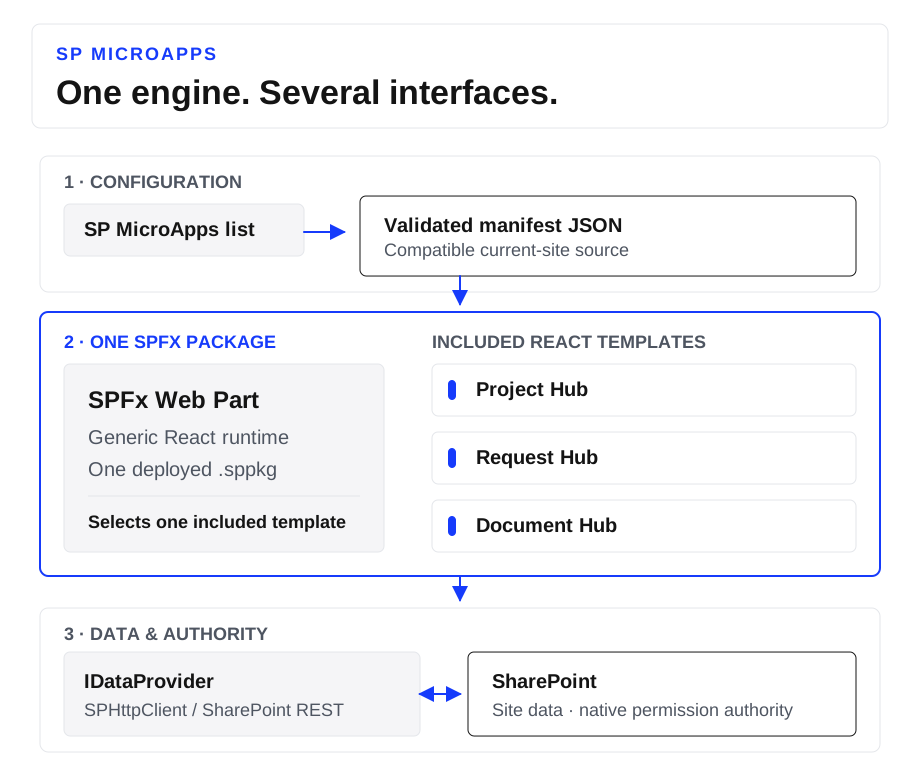
Read the diagram from validated configuration through the engine and bundled template to current-site SharePoint data. Reuse still requires compatible sources and fields.
The engine does not create a parallel permission system. It can read effective capabilities to adapt the actions it offers; SharePoint authorises or refuses reads and writes under the signed-in person’s identity. List, item, and library permissions remain the authority.
The package contains the executable templates. Configuration can select an existing capability, connect a source, set bindings and labels, and enable available options. A new interaction, template, or capability needs development and a package update. That is the practical line between configuration and code.
POC stack. The project is written in TypeScript, using SPFx 1.23.2 and React 17.0.1. Node.js 22 and Heft compile the code to JavaScript and produce the
.sppkgpackage. The browser then runs the delivered JavaScript; Node.js and Heft are used only during the build.
The historical Project/Request switching demonstration on package 1.0.0.3 checked that line: changing the manifest selected a different template while the page and App ID stayed the same. The deployed JavaScript assets stayed identical; the engine selected another template already bundled in the package. No build, deployment, or asset replacement occurred during the switch.
Building with AI coding agents
The POC was developed with AI coding agents, starting from a precise brief: a closed configuration contract, capabilities bundled in the package, and a clear line between what a site can configure and what needs code. The agents assist during development; the delivered application runs on SPFx, React, and SharePoint REST.
Work was split into bounded tasks for the provider, interfaces, contracts, tests, and review. That split made it possible to cross-check changes against the relevant contracts and against behaviour observed in SharePoint.
One duplicate-upload test illustrates this. SharePoint returned a response that the prototype classified as an unknown error. The handling was corrected to recognise the conflict and let the user rename the file without losing their selection or the metadata they had entered. Targeted tests then covered the case, which was also checked against a real library.
To reuse this approach, start with a contract and a verification criterion for each task assigned to an agent. The proposed code can then be checked against other components, tests, and the platform’s actual behaviour.
POC limits and evidence
Document Hub limits belong to this POC, not to SharePoint generally: one to eight libraries in the same site, a 500-document working set, and one upload of up to 20 MiB to the root of a current-site library. Notifications, approvals, retention, batch upload, chunked transfer, and records management are outside scope.
The document extension was verified later on package 1.3.0.1: three demonstration files were uploaded to SharePoint and their metadata was read back. For this document increment, the size limit, permission refusals, ETag conflicts, and ambiguous responses were tested through simulation. These checks do not replay every historical Project Hub and Request Hub scenario on that version.
The article’s captures are local illustrations with synthetic data; they are not evidence of those SharePoint tests.
What this approach makes possible
The transferable principle is simple: build a limited family of interfaces, share their foundations, then configure their use while a need remains within that family. When it does not, choose another option or develop a new capability.