Power Apps
Power Apps in Microsoft 365 Copilot: Model-Driven Apps Meet the AI Assistant
Microsoft now lets you expose model-driven Power Apps directly inside M365 Copilot via a built-in MCP server. Here is what it means for adoption, governance, and the future of business apps.
The Adoption Problem Nobody Talks About
Enterprise teams spend months building model-driven apps on Dataverse. The data model is clean, the business rules are solid, the security roles are configured. Then reality hits: users do not open the app. They stay in Teams, in Outlook, in the tools they already know. The app sits there, underused, while the data it was supposed to capture keeps living in spreadsheets and emails.
This is the core adoption challenge for every Power Platform team. The app might be excellent, but if it requires users to context-switch, adoption suffers.
After years of helping enterprise teams ship model-driven apps that users eventually abandoned, this announcement felt like the missing piece. Here is what it actually changes on the ground, and why I think it matters more than the average preview.
What Just Changed
On April 2, 2026, Microsoft announced a public preview that directly addresses this problem: model-driven Power Apps can now be exposed inside Microsoft 365 Copilot through a built-in MCP (Model Context Protocol) server.
In practical terms, this means a user can ask Copilot something like "Show me all open support tickets assigned to me" and get a live, interactive Power Apps grid, right inside the Copilot chat. No tab switching. No separate app to open.
The feature works by packaging the Power App as a Copilot agent extension. The MCP server handles the communication between Copilot and Dataverse, translating natural language requests into app interactions.
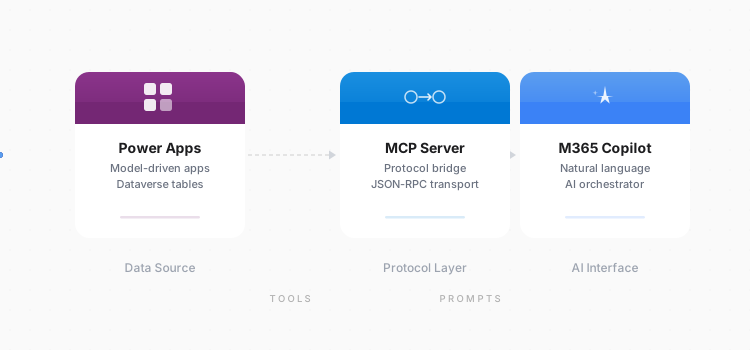
Three Capabilities
The preview ships with two capabilities available now and a third on the roadmap.
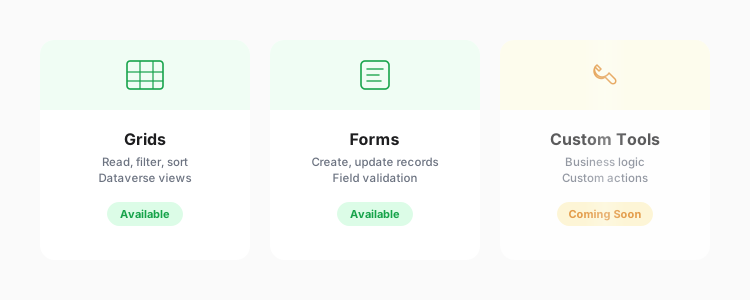
Grids: Interactive Data Exploration
Copilot can render full Power Apps grids inline. These are not static tables: they are the same interactive grids from the model-driven app, with sorting, filtering, and column resizing. Users can explore data without leaving the conversation.
A project manager could ask "Show me all projects due this month with status delayed" and immediately get a filterable grid of matching records from Dataverse.
Forms: View and Edit Records
Beyond read-only grids, Copilot can surface individual record forms. Users can view record details and, critically, edit them inline. Field validation, business rules, and security roles all apply exactly as they would in the full app.
This turns Copilot from a read-only assistant into a genuine data entry point. A field technician could ask "Open the work order for site 47B" and update the status directly in the chat.
Custom Tools: Coming Soon
The third capability, custom tools, is not yet available in this preview. It will allow developers to expose specific app actions - custom buttons, workflows, or business logic - as discrete tools that Copilot can invoke. This is the piece that will unlock more complex scenarios beyond CRUD operations.
| Capability | Status | What It Does |
|---|---|---|
| Grids | Available | Interactive data grids with sort, filter, resize |
| Forms | Available | View and edit individual records with full validation |
| Custom Tools | Coming Soon | Expose custom actions and workflows to Copilot |
How to Set It Up
Activating this feature involves three steps.
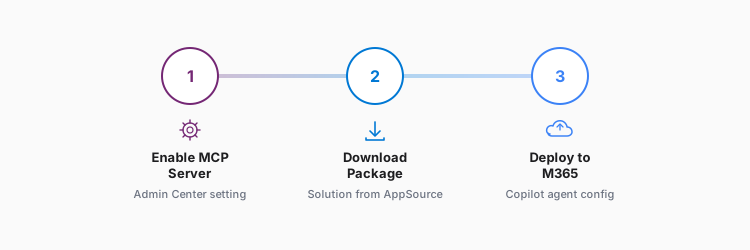
Step 1: Enable the MCP Server. In the Power Apps maker portal, open the model-driven app settings and enable the MCP server toggle. This exposes the app's tables and views as MCP-compatible endpoints.
Step 2: Download the Agent Package. Once the MCP server is active, download the agent package from the same settings panel. This package contains the agent definition that Copilot needs to understand what the app can do.
Step 3: Deploy to Teams and M365. Upload the agent package through the Teams admin center or the M365 admin center. Once deployed, users with the right licenses can start interacting with the app through Copilot.
The entire setup takes under 15 minutes for an existing model-driven app. No code changes required.
What This Changes for Enterprises
Adoption Without the App Switch
The most obvious impact is on adoption. If users can interact with Dataverse records without leaving Copilot, the friction that killed adoption in many organizations disappears. The app becomes invisible infrastructure rather than a destination.
Governance Stays Intact
A common concern with AI-powered data access is governance. Here, the model-driven app's security model applies fully. Row-level security, field-level security, business rules: everything enforced in the app is enforced through Copilot. Users only see and edit what their security role permits.
A New Surface, Not a New App
Power users who need the full app experience still have it. Casual users who just need to check a record or update a field can do it through Copilot. The same app serves both audiences.
Current Limitations
This is a public preview, and several constraints apply.
- Model-driven apps only. Canvas apps and custom pages are not supported in this preview.
- Custom tools are not available yet. The current preview is limited to grids and forms. More complex interactions will come later.
- Preview stability. As with any public preview, expect rough edges. Microsoft has not committed to a GA date.
- MCP server scope. The MCP server exposes tables and views configured in the app. Complex customizations or embedded canvas apps within model-driven apps may not translate fully to the Copilot experience.
The Bigger Picture
This feature is part of a broader trend: business applications becoming ambient rather than destination-based. Instead of asking users to go to the app, the app comes to where users already work.
For Power Platform teams, this shifts the value proposition. Building a model-driven app is no longer just about creating a standalone tool: it is about creating a data layer that can surface anywhere. The same Dataverse investment now serves the full app, the Copilot experience, and potentially other MCP-compatible surfaces in the future.
The public preview is available now. Organizations already running model-driven apps on Dataverse with M365 Copilot licenses can start testing immediately.
Update note: I am testing this on a real model-driven app as soon as I get access to a Microsoft 365 Copilot license. Expect this article to be updated with hands-on screenshots and a real-world walkthrough shortly after.
Based on the announcement by Claudio Romano on the Microsoft Power Apps Blog, April 2, 2026.