Power Apps
Power Apps Per-App License Is Gone: What Teams Need to Do Now
Microsoft quietly retired the $5/user/app Power Apps Per-App plan on January 2, 2026. No blog post, no email - just a line removed from a PDF. Here's what changed, who's affected, and how to choose between Premium and Pay-As-You-Go.
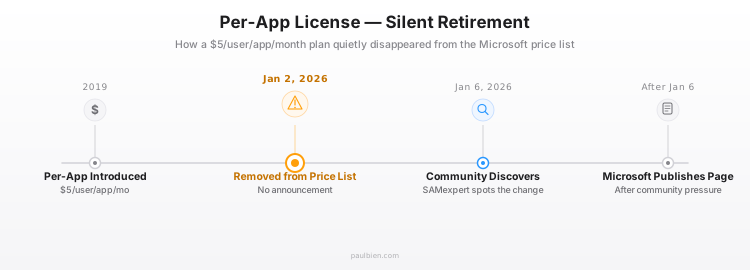
On January 2, 2026, Microsoft removed the Power Apps Per-App plan from its price lists. No blog post. No email to customers. No Tech Community announcement. The change was discovered four days later when licensing analysts noticed a line missing from the January 2026 licensing guide PDF.
A license that thousands of organizations relied on for targeted Power Apps deployments: gone with a PDF edit.
This article covers what the Per-App plan was, why it was retired, what replaces it, and how to choose the right path forward depending on team size and usage patterns.
What the Per-App plan was
The Per-App plan cost $5 per user per app per month. One license covered one user accessing one specific app: Canvas, Model-Driven, or Portal. It included full Dataverse access, premium connectors, and on-premises data gateway support.
The economics were straightforward: at 4 apps per user, Per-App ($5 x 4 = $20) equaled the Per-User plan ($20/month). Below 4 apps, Per-App was cheaper. Above 4, Per-User won.
For organizations deploying a single inspection form to 50 field workers, or a single approval app to a department of 20, Per-App was the rational choice. It was introduced in 2019 specifically for these targeted scenarios.
Why Microsoft retired it
Microsoft provided no official explanation. The licensing update page states the fact without rationale. Industry analysts have converged on three likely reasons.
Compliance was unenforceable. Microsoft never built the technical layer to verify that a Per-App licensed user only accessed their designated app. Admins had no native tooling for enforcement. The license existed commercially but was impossible to audit, creating risk for both Microsoft and customers.
Licensing complexity created sales friction. Stacking Per-App licenses across users and apps generated administrative overhead in Enterprise Agreements, renewals, and true-up processes. Every licensing conversation required a calculator.
The revenue model is shifting. Microsoft's broader strategy pushes toward either flat-rate subscriptions (Premium) or Azure consumption billing (Pay-As-You-Go). Per-App was a fixed-fee hybrid that fit neither model cleanly.
What replaces it
Two options remain for licensing Power Apps with premium features.
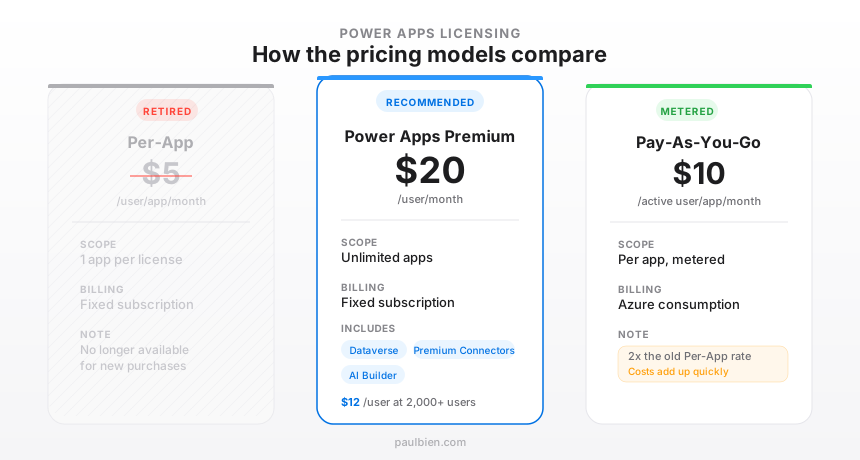
Power Apps Premium: $20/user/month
- Unlimited apps per licensed user
- Full Dataverse, all premium connectors, Power Pages
- 500 AI Builder credits per user per month
- Volume discount: $12/user/month at 2,000+ users (EA negotiation)
- Best for users who access multiple apps regularly
Pay-As-You-Go: $10/active user/app/month
- Billed through an Azure subscription
- Charges based on unique users who open an app at least once per calendar month
- Same capabilities as Premium in enabled environments
- Best for sporadic or seasonal usage
Who is affected, and who isn't
The impact depends on the licensing agreement channel.
Enterprise Agreement (EA): Fully grandfathered. Existing customers can continue using and renewing Per-App after their current agreement ends. No forced migration, no deadline.
Cloud Solution Provider (CSP): Fully grandfathered. Same treatment as EA: existing subscriptions continue and can be renewed.
Microsoft Products and Services Agreement (MPSA): Partial protection. Current agreements remain active, but when the agreement ends, Per-App will not be offered for renewal. There is a 60-day window after expiry to migrate to an alternative.
New customers (from January 2, 2026): Cannot purchase Per-App. Must choose Premium or PAYG from day one.
How to choose: Premium or Pay-As-You-Go
The decision depends on three variables: how many users, how many apps per user, and how often they open those apps.
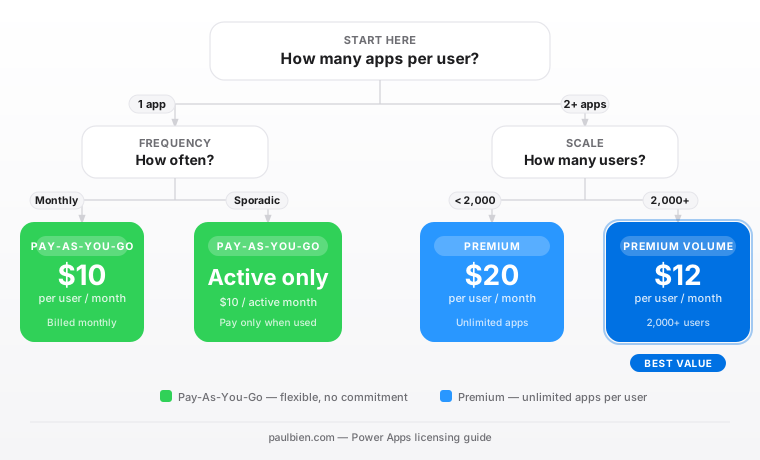
Single app, sporadic usage: PAYG wins. If users open the app only a few months per year, consumption billing avoids paying for idle months.
Single app, monthly usage: PAYG at $10/month vs Premium at $20/month. PAYG is half the cost when each user only needs one app.
Two or more apps, regular usage: Premium wins. Two apps on PAYG = $20/month, matching Premium's flat rate. Three or more and Premium is clearly cheaper.
2,000+ users: Negotiate Premium volume pricing at $12/user/month. At that scale, even single-app users may benefit from the volume rate.
Cost impact by scenario
| Scenario | Old (Per-App) | Premium | PAYG | Change |
|---|---|---|---|---|
| 20 users, 1 app, monthly | $100/mo | $400/mo | $200/mo | +100% to +300% |
| 50 users, 1 app, 6 mo/yr | $250/mo | $1,000/mo | $500 x 6/12 = $250/mo avg | 0% to +300% |
| 100 users, 3 apps | $1,500/mo | $2,000/mo | $3,000/mo | +33% to +100% |
| 500 users, 2 apps, EA vol. | $5,000/mo | $6,000/mo ($12 EA) | $10,000/mo | +20% to +100% |
Small, targeted deployments, the exact use case Per-App was designed for, face the steepest cost increase.
The nonprofit question
Microsoft previously offered 10 free Per-App licenses to qualifying nonprofits. With the plan retired, the status of these grants is unclear. Microsoft's Elevate program for nonprofits has not yet published guidance on a replacement benefit. Organizations relying on these free licenses should contact their Microsoft nonprofit account team proactively.
What this signals
Three patterns emerge from this retirement.
Azure-first billing. Pay-As-You-Go requires an Azure subscription, consumption monitoring, and billing governance. Microsoft is steering Power Platform toward Azure metering, the same model used for Azure SQL, Cosmos DB, and other cloud services.
Simplification through elimination. Rather than fixing the compliance gap in Per-App, Microsoft chose to remove the product entirely. Fewer SKUs means fewer licensing conversations, fewer audit disputes, and simpler sales motions.
The "silent retirement" precedent. Removing a widely-used license via a PDF update, with no proactive communication, sets a concerning precedent. Organizations that budget based on current SKU availability should monitor Microsoft's monthly licensing guide changes, not just blog announcements.
Action items
- Audit current Per-App usage. Identify all users holding Per-App licenses, which apps they access, and how frequently.
- Check your agreement type. EA and CSP customers can renew: there is no urgency. MPSA customers should plan migration before agreement expiry.
- Model the cost difference. Use the decision framework above to compare Premium vs PAYG for each user segment.
- Monitor nonprofit guidance. If the organization relies on free Per-App grants, contact Microsoft's nonprofit team.
- Consider PAYG for seasonal use. Field workers, seasonal staff, and project-based teams may benefit from consumption billing despite the higher per-unit rate.
Sources:
- Important update to Power Apps per app license - Microsoft Licensing
- Power Apps Per App Plan Discontinued - SAMexpert
- Power Apps per app plan end of sale - The Licensing Guide
- What should Power Apps per app customers do now? - The Licensing Guide
- Pay-as-you-go plan overview - Microsoft Learn
- Power Apps Pricing - Microsoft