Copilot Studio
An AI Onboarding Assistant in Under an Hour with Copilot Studio
How Microsoft Copilot Studio and SharePoint combine to create a knowledge-grounded onboarding agent that answers new hire questions instantly - with zero code.
New hires ask the same questions. HR teams answer them over and over. It is one of the most common, and most avoidable, bottlenecks in any organization.
Microsoft Copilot Studio offers a compelling solution: a knowledge-grounded AI agent that answers onboarding questions instantly, 24/7, by pulling answers directly from SharePoint documents. No hallucination, automatic source citations, and zero code required.
The Pattern: SharePoint + Copilot Studio
The approach is straightforward:
- SharePoint serves as the knowledge base: a Communication Site with onboarding documents (employee handbook, IT setup guide, benefits overview, office guide, security policies)
- Copilot Studio provides the AI agent layer: it indexes the SharePoint content and generates grounded, cited answers using generative AI
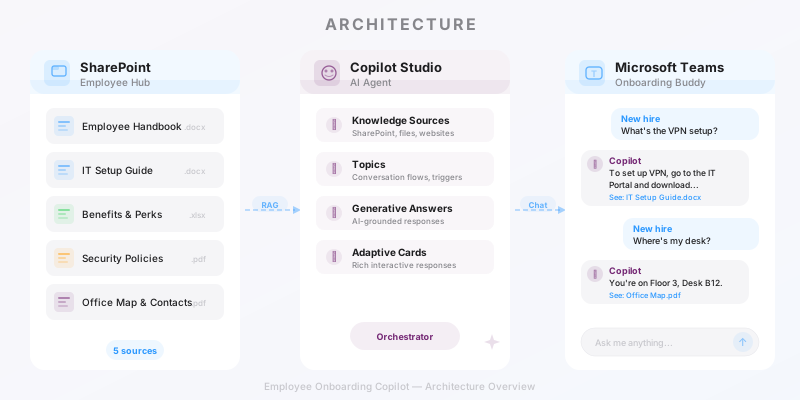
This is the same pattern used in the Dunaway case study, where a single Copilot Studio agent replaced manual searches across 200+ regulatory documents, achieving a 90% reduction in research time.
What It Looks Like
The agent, called Onboarding Buddy, handles questions like:
- "How do I set up my laptop and get access to company tools?"
- "What health insurance options are available?"
- "What are the password requirements?"
Each answer comes with step-by-step instructions grounded in the actual documents, plus clickable source citations.
Screenshot not reproduced in this edition pending privacy review. Copilot Studio test pane showing the agent answering an IT setup question with referenced knowledge sources
Key Takeaways
| Aspect | Detail |
|---|---|
| Setup time | ~30 minutes total |
| Code required | None |
| Knowledge source | 1 SharePoint site, 5 documents |
| Response quality | Grounded, step-by-step, with citations |
| Model | GPT-5 Chat (default) |
The main limitation: the Power Platform Developer Plan allows testing in the Copilot Studio test pane, but publishing to Teams or other channels requires a paid Copilot Studio license.
Full Tutorial
For a complete step-by-step walkthrough, from creating the SharePoint site to configuring the agent and testing all scenarios, check out the full guide:
This pattern works far beyond onboarding: IT helpdesk, compliance Q&A, project docs, customer support - anywhere users need quick answers from documents.
The pattern applies far beyond onboarding: IT helpdesk, compliance Q&A, project documentation, customer support - any scenario where users need quick answers from a large document corpus.