Governance
Microsoft Entra Agent ID: Governing the Identity of Your AI Agents
AI agents are being built faster than governance can keep up. Microsoft Entra Agent ID gives every agent its own managed identity, bringing Conditional Access, lifecycle, and audit to nonhuman actors. Here is what is generally available, what is still preview, and a checklist for CoE leads.
The agent nobody registered
It is a Saturday. A well-meaning maker opens Copilot Studio, wires an agent to a SharePoint library and a Dataverse table, and publishes it to Microsoft Teams so a few colleagues can try it. By Monday, the agent is answering questions using data that the maker could read, but that the people chatting with it were never meant to see. Nobody approved it. Nobody knows it exists. It does not appear in any inventory, and no policy applies to it.
This is the shadow-agent problem, and it is not a story about careless people. It is a story about missing identity. For years, an AI agent that needed to reach a corporate system borrowed an identity: a service principal here, a connection reference there, a token scoped to whatever the maker happened to have. When an actor has no identity of its own, there is nothing to attach a policy to, nothing to audit, and nothing to revoke. You cannot govern what you cannot name.
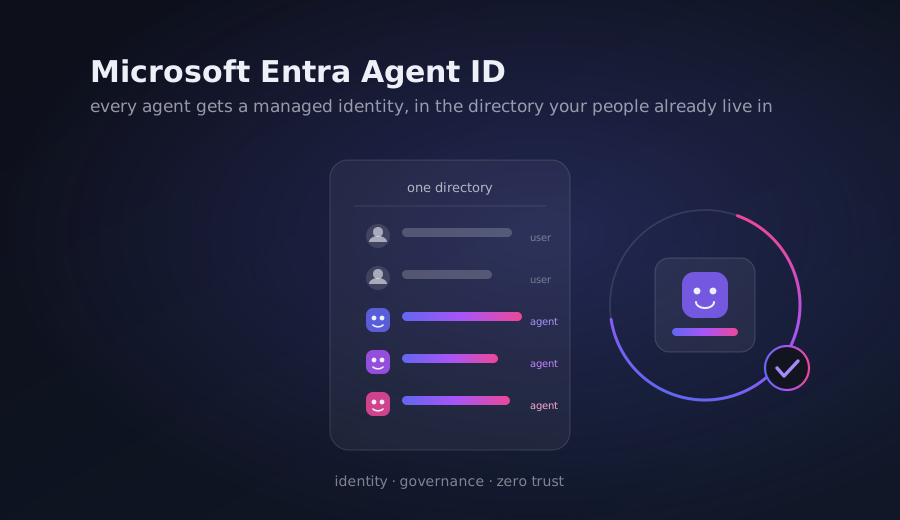
Microsoft Entra Agent ID is the answer to that gap. It gives each agent a managed identity in the same directory that already holds your people, so the same governance model you use for users starts to apply to agents.
What Entra Agent ID actually is
Microsoft Entra Agent ID is an identity and security framework that extends Microsoft Entra to AI agents. Rather than borrowing a service principal, an agent gets a purpose-built identity construct designed for nonhuman actors. The platform introduces four new object types: an agent identity blueprint, a blueprint principal, an agent identity, and an agent user. The blueprint works as a template. It lets an organization apply Conditional Access rules, permissions, and governance controls once, and have every current and future agent instance inherit them automatically. Disabling or revoking an entire class of agents becomes a single operation.
The practical shift for Power Platform teams arrives in the connected products. Copilot Studio automatically creates a Microsoft Entra Agent ID for each new agent, following the rollout of automatic creation in July 2026. When you build your first agent after that rollout, Copilot Studio adds a blueprint named "Microsoft Copilot Studio agent identity blueprint" to your tenant, and every agent identity is created as a child of it.
What it unlocks
Once an agent has its own identity, the governance surface that already exists for users becomes available for agents.
Connector permissions become visible as API permissions. When a maker publishes a Copilot Studio agent, each Power Platform connector the agent uses is attached to the agent's Entra Agent ID as an application programming interface (API) permission. An Entra or Microsoft 365 administrator can now see what an agent can call without ever opening the Power Platform admin center. Those scopes do not replace your existing guardrails: they are re-validated at runtime against Advanced Connector Policies and Data Loss Prevention (DLP), so they cannot be used to bypass a policy you already have in place.
Conditional Access can target agents. Because those connector scopes are first-class permissions on the agent identity, you can require network location, device compliance, or risk-based conditions before a token is issued for a specific resource. Conditional Access (CA) for agents requires Microsoft Entra ID Plan 1 or Plan 2 and a Microsoft Agent 365 license per user, with license enforcement coming soon.
Audit and lifecycle come along. Microsoft Entra ID logs authentication activity for agents, so sign-in events are visible in the admin center. Every agent identity requires a human sponsor accountable for its purpose and access, and if a sponsor leaves, sponsorship transfers automatically to their manager. Access is granted through the same entitlement management access packages used for people, giving time-bound, auditable access with approval workflows.
The nuance that matters: general availability is not the same as "everything works everywhere"
Here is where realistic expectations matter. Microsoft Entra Agent ID as an identity platform is generally available, and it is available to all Microsoft Entra customers. That is genuinely a milestone. But "generally available" describes the identity layer, not every enforcement mechanic on top of it, and the distinction is easy to miss.
Agents reach resources through two different flows, and they are not equally mature in the tooling.
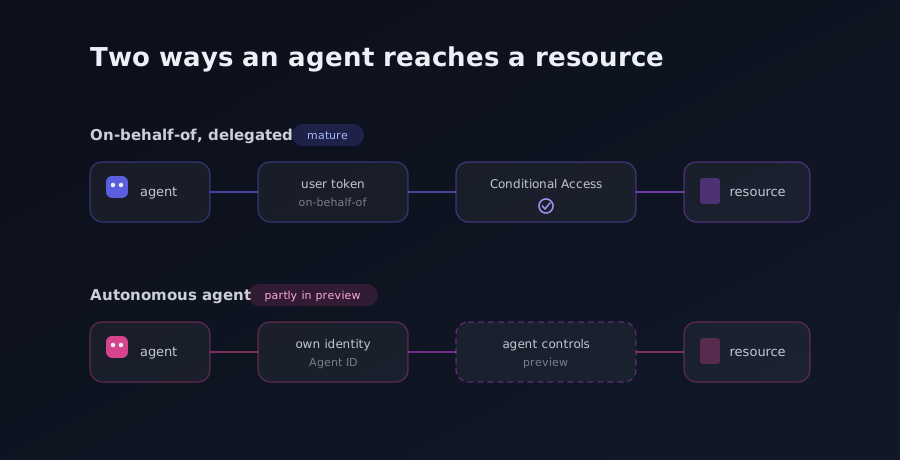
- On-behalf-of (OBO), also called delegated access. A signed-in user authorizes the agent, and the agent acts with that user's identity and permissions. Because the user is the subject of the token, Conditional Access policies here target users and groups, not the agent, and they build on the mature CA controls you already run.
- Autonomous, also called client credentials or app-only. No user is present. The agent authenticates as itself, so the token's subject is the agent identity, and Conditional Access targets the agent directly.
Both flows are documented and supported, and Microsoft ships CA templates for each. The catch is that many of the controls that make autonomous-agent policies useful are still labeled Preview in the policy builder: the "All agent users" assignment, the "Agent risk" condition driven by Entra ID Protection, and the "Agent execution environments" condition that scopes device-compliance checks to agents actually running on a managed endpoint. Device compliance itself is only evaluated today for agents on Windows 365 Cloud PCs for Agents, because that is where Intune enrollment exists. And controls built around a human, such as multifactor authentication, simply have no user to challenge in an autonomous flow.
Above the identity layer sits Microsoft Agent 365, the operating layer that lets agents work across Microsoft 365 as teammates. Several of its capabilities, including agents onboarding with their own identity in the Microsoft 365 admin experience, are still delivered through the Frontier preview program rather than general availability. So the honest summary for a decision-maker is this: the identity foundation is production-ready, the audit and lifecycle story is real, and the more advanced autonomous-enforcement and teammate experiences are arriving in stages.
A checklist for CoE leads
If you run a Center of Excellence (CoE), the arrival of agent identities is a chance to close the shadow-agent gap before it widens. A pragmatic sequence:
- Confirm automatic identity creation per environment. Validate that new Copilot Studio agents receive an Entra Agent ID and locate the Copilot Studio blueprint in your tenant, so you know where new agent identities land.
- Inventory before you enforce. Use the Entra admin center and Microsoft Graph to list existing agent identities. Remember that pre-rollout agents still appear as app registrations during the transition, so review both.
- Assign a human sponsor to every agent. Sponsorship is the accountability anchor. Make sure no agent identity is orphaned, and lean on the automatic sponsor-to-manager transfer to keep oversight continuous.
- Map Conditional Access policies to agent flows. Start OBO policies against users and groups, where controls are mature. Pilot autonomous-agent policies in report-only mode first, given the Preview status of several conditions.
- Connect this to your existing DLP. Connector scopes on an agent identity are re-validated against DLP and Advanced Connector Policies at runtime. Treat agent identity as added visibility layered on the DLP you already run, not a replacement for it.
The shadow agent from Saturday morning does not disappear because a new product shipped. It disappears when every agent your organization builds has a name in the directory, a sponsor who answers for it, and a policy that decides what it may touch. Entra Agent ID makes that possible today. The work of turning it into a habit is yours.