Dataverse
The Dataverse Skills Plugin: What Microsoft Just Made Official
On July 21 Microsoft shipped a plugin that turns years of Dataverse practitioner habit into eight named skills. The headline rule, managed SDK over raw HTTP, is exactly what careful makers already did by hand. But a hands-on evaluation surfaced two fresh SDK v1.0.0 defects and one governance surprise nobody mentions: the MCP endpoint enforces a client allowlist.
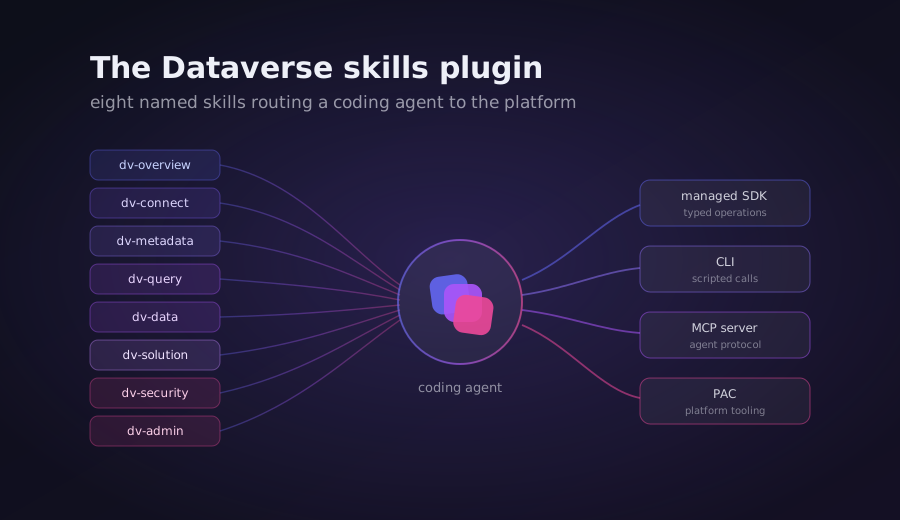
On July 21 Microsoft published a Dataverse plugin for coding agents. The framing is modest: a marketplace listing, an install command, eight skills. Read the skills and something more interesting shows up. Microsoft has taken a set of habits that experienced Dataverse practitioners built by hand, over years, and written them down as named, enforceable rules.
The headline rule is one many makers already follow without ever stating it: prefer a managed SDK over raw HTTP. This evaluation put the plugin through a real workload on a development tenant to see whether the official version holds up, or whether it just relabels what people were doing anyway.
The short answer: the guardrails are the real value and they are genuinely good. The execution layer works but is no better than doing it by hand. And the young SDK it leans on has two defects worth knowing before you trust it with schema changes.
What the plugin actually is
It is not a binary. It is procedural knowledge plus a few helper scripts, packaged so a coding agent can load it. The plugin ships eight skills written in natural language (each a SKILL.md) that route an agent across four execution surfaces:
- a Dataverse MCP server (a stdio proxy to
npx @microsoft/dataverse), - a Dataverse CLI (the npm package
@microsoft/dataverse), - a Python SDK (
PowerPlatform-Dataverse-Client), - and the PAC CLI for solution lifecycle.
The eight skills split the domain cleanly: dv-overview (cross-cutting routing and the hard rules), dv-connect (one-time setup and auth), dv-metadata (tables, columns, relationships, forms, views), dv-data (create, bulk import, sample data), dv-query (reads, filters, aggregates), dv-solution (solution lifecycle via PAC), dv-admin (bulk delete, retention, org settings behind a hard allowlist), and dv-security (roles, app users, business units).
The heart of it is a script called auth.py. It resolves authentication in priority order: a service principal from a .env file first, then the shared MSAL cache from the Dataverse CLI, then interactive device code. It also stamps a telemetry User-Agent on every call so Microsoft can attribute plugin traffic. Everything else in the plugin routes through that one auth layer.
The evaluation: three scenarios, one tenant
The test ran on a development tenant with an artifact prefix so nothing collided with existing work. Three scenarios: author metadata, run data and query operations, and export a solution. Every write was verified against the raw API, then cleaned up and confirmed gone.
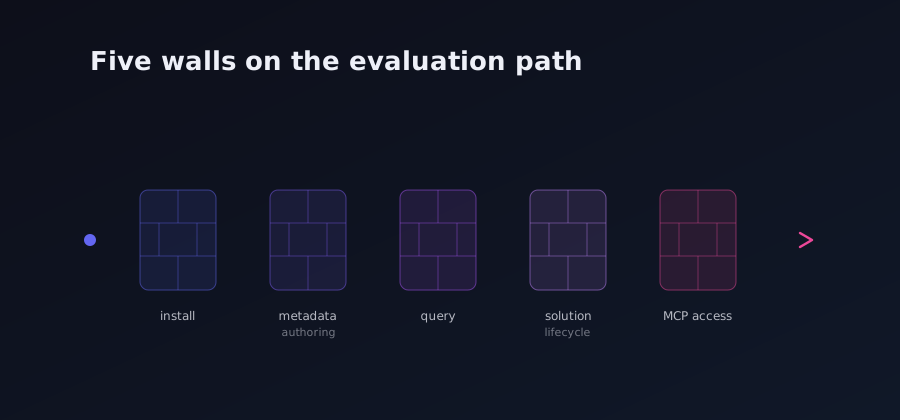
Getting to the first scenario surfaced the first wall.
Wall 1: the install and auth path assumes a human
The documented Claude Code install is /plugin install dataverse@claude-plugins-official, an interactive session command that triggers a restart and an auth popup. An autonomous agent cannot run that command or click through the popup. The workaround was to read the skills straight from a clone and execute them faithfully, which tests the substance of the plugin rather than its packaging.
Auth had its own version of the same problem. The plugin's default non-interactive path, the shared Dataverse CLI cache, failed with a silent token acquisition error because the CLI had never been authenticated, and the prescribed fix (dataverse auth create --deviceCode) is interactive. The service principal path worked and produced a valid token. That is the plugin's own non-interactive route, so the scenarios ran on it.
Wall 2: the SDK produces an invalid date column
Scenario A created a publisher, a solution, and a table poc_projet with three columns: a primary text column, a decimal, and a date. All three were created and verified with an HTTP 200 against the entity definitions. Then a choice column was added, and it failed:
HttpError: Failure in generation Filteredpoc_projet for attribute poc_datedebut. Verify metadata for that attribute.
The root cause is a defect in the SDK, not the schema. The SDK's "datetime" type mapping produced a column with Format=DateOnly but DateTimeBehavior=None, which is an invalid combination. That combination breaks the generation of the table's Filtered SQL view, and once that view cannot regenerate, every subsequent column addition on that table fails, even a plain boolean. The failure persisted across three attempts. It is invisible until you add a second column, and then it locks the table's schema.
Wall 3: a query footgun with no guardrail
Data operations worked cleanly: five rows created, a filtered and sorted query returned the right records. But the query surface has a sharp edge. Passing orderby="poc_budget desc" as a bare string gets exploded into a list of individual characters, producing an invalid $orderby and an error that literally shows the split characters. The signature wants Optional[List[str]], so orderby=["poc_budget desc"] is correct. Nothing in the SDK catches the string case. It is a footgun, easily worked around once you know it, and easy to trip the first time.
Wall 4: the solution parameter that does not route
Scenario C exported the solution and it succeeded in twelve seconds, but the exported zip was empty of the table. The root cause: the table component was registered against the Default solution, not the target solution. In other words, client.tables.create(solution="poc_dvplugin") did not route the table into the named solution. It landed in Default and stayed there.
The fix came from the plugin's own PAC path: add the table as a solution component explicitly, then re-export. The second export produced a proper zip containing the table and its three columns, verified in customizations.xml. So the plugin recovered, but only because PAC was there to correct the SDK. The solution= parameter is a quiet no-op.
Wall 5: the MCP endpoint enforces a client allowlist
The most interesting finding came from exercising the MCP server, the surface that carries the richest managed tooling. There are two ways to reach it.
Through the plugin's own proxy, authenticating with the service principal, the handshake returned HTTP 403 verbatim:
The application '...' is not authorized to access MCP. For details on approved clients and instructions to enable additional applications, see: https://aka.ms/configuremcpclientlist
The service principal authenticated fine. The /api/mcp endpoint itself enforces a client allowlist, and an arbitrary service principal is not on it. This is a governance control most teams will not expect. The remedy the plugin prescribes is either a one-time admin operation, dataverse mcp allow <appId>, or using a pre-approved client such as the Dataverse CLI's own app.
Through the second path, the Dataverse CLI's native MCP server using its pre-approved app, the handshake completed cleanly. The server reported itself as version 1.0.59.0, and tools/list returned 16 tools: read_query, create_table, update_table, delete_table, create_record, update_record, delete_record, search, upsert_skill, create_skill_resource, delete_skill, describe, search_data, init_file_upload, commit_file_upload, and file_download. The three destructive tools carry a destructiveHint and require an explicit approval flag. A real read-only tool call returned rows with no error.
One more thing the second pass settled: non-interactive auth is possible for the CLI and the SDK (service principal, managed identity, and federated options all exist), but not for the MCP server via an arbitrary service principal. The realistic headless MCP path is a pre-approved client, or an admin allowlisting the principal first.
Plugin versus doing it by hand
Here is the honest comparison against a lightweight manual approach (a small token helper plus PAC directly).
| Criterion | Dataverse skills plugin | Manual approach |
|---|---|---|
| Setup | Heavy: Python SDK, pandas, msal-extensions, the DV CLI, PAC, .NET, and interactive auth | Light: a token helper already in place |
| Speed | Good once set up: SDK reads under a second, PAC export around twelve seconds | Comparable, with no setup |
| Guardrails | Superior: hard rules, a bulk-delete gate, a hard allowlist on org settings, telemetry attribution | Ad hoc, living in the operator's head |
| Coverage | Broad: metadata, data, query, solution, admin, security | Only what gets coded case by case |
| Token cost | High: skills are long and load into context, expensive without a context saver | Minimal |
| SDK reliability | Two defects and one footgun hit in this run; v1.0.0 is young | Known and stable for its scope |
The verdict: adopt partially
The plugin is worth adopting for what it standardizes, not for what it executes. Three findings drove the recommendation.
First, it formalizes a rule careful makers already followed: prefer a managed surface that carries auth, paging, and retry, and reserve raw HTTP for genuine SDK gaps. Seeing that written down as an enforceable hard rule is useful on its own.
Second, the Python SDK at v1.0.0 has real defects on metadata authoring. A date column can lock a table's schema, and the solution= parameter can silently fail to route. Both are invisible until an export or a second column exposes them. A managed layer does not remove the need to verify the raw result.
Third, the plugin's value is the guardrails and the intent-to-skill routing, not the execution. Export and create work just as well by hand. What the plugin adds is deterministic safety gates and a routing table, at the cost of high context verbosity and a dependency on a young SDK.
A short checklist for a governance team evaluating this:
- Borrow the guardrails into your own skills or standards: the hard rules, the bulk-delete gate, the org-settings allowlist, and the "confirm the environment before the first write" habit. This is the real value.
- Do not depend on the SDK v1.0.0 for critical metadata authoring until the date-column and
solution=defects are fixed. Keep PAC in the loop for export and solution work; it was needed to route the table anyway. - Plan the MCP allowlist before any headless or CI use. An arbitrary service principal will get a 403 from
/api/mcp. Either allowlist the principal with an admin operation, or use a pre-approved client. - Budget the context cost. The skills are long and load into context. Without a context-saving layer, they are expensive to keep loaded across a session.
The plugin is a good thing. It is Microsoft agreeing, in writing, with what disciplined practitioners already believed. Just go in knowing the SDK underneath is version one, and the MCP door has a lock on it that nobody put on the slide.