AI agents
Agent harnesses: how AI moves from answers to actions
The model reasons. The harness coordinates the work. Here is an example that explains the difference.
You ask an AI: “Compare these three procedures and prepare a report on any contradictions.” To succeed, it needs to read the right files, analyse their contents and create a document. A capable model helps. It also needs a system to keep the work moving.
That system is called a harness. It is the agent’s execution engine: it prepares information for the model, coordinates tool calls and returns their results. The model can then propose the next step, ask for clarification or finish its response. 1
There are three roles to distinguish:
- The model reasons and proposes the next action.
- The tools read a document, perform a calculation or save a file.
- The harness coordinates exchanges between the model and those tools, within the configured limits.
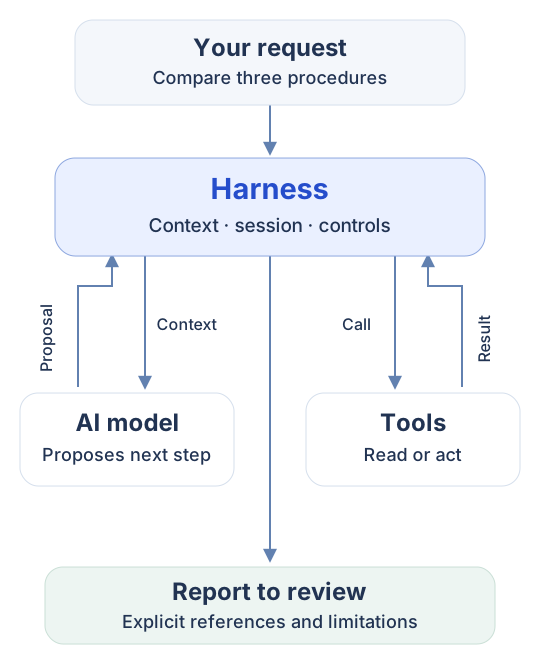
These exchanges repeat until the agent produces a response or reaches an execution limit. The result still needs checking.
Where does this engine live? It is built into the product running the agent. Harnesses appear in VS Code and Copilot Studio. In Copilot Studio, you configure your agent in a browser; you do not need to open VS Code. Here, “GitHub Copilot harness” refers to its integration within Copilot Studio. 1 2
Back to our procedure review. A tool retrieves the documents. The model identifies potential discrepancies; if a procedure is missing, it can ask for clarification. The harness coordinates these steps, then a tool prepares the report. The user should be able to trace every reported contradiction to a supporting passage. This is an illustrative scenario, not a test result.
In Copilot Studio, two frequently compared engines offer ways to approach this work:
- Standard lets you build behaviour using topics—sequences of questions and actions—and tools. Its generative orchestration can already select and combine these components. 3
- GitHub Copilot harness centres development on a goal, instructions and resources. It includes a workspace for handling files, running code and adapting the work based on results. 4
For our report, the second option could reduce the amount of assembly required. But Standard can also process files and run Python through Code Interpreter. The difference lies in how you build the solution and the results you achieve. 5
A skill can complement the agent: it packages a reusable method, such as our review checklist and report template, potentially with scripts. It guides the work; tools provide the actions. 6
Two points matter before choosing. First, AI operations during development and testing with the GitHub Copilot harness may consume credits. A Microsoft 365 Copilot licence does not cover these uses. 7
Second, available features and channels differ. Microsoft does not provide a direct way to transfer an agent between Standard and the GitHub Copilot harness. It is therefore worth trying them on a real task before choosing. 8 9
I would compare them using the same procedures: discrepancies found, accurate references, corrections needed, development time and cost. The right engine is the one that delivers the service you need, with quality you can verify.
Sources and further details
- Microsoft — Harness definition.
- Microsoft — Harnesses in Copilot Studio. There is also a third engine, Copilot chat, for extending Microsoft 365 Copilot Chat.
- Microsoft — Standard generative orchestration.
- Microsoft Copilot Studio CAT — Sandbox. This workspace is temporary; external access goes through configured tools and knowledge sources.
- Microsoft — Code Interpreter in prompts.
- Microsoft — Skills.
- Microsoft — Cost management. The Copilot Credits guide, September 2026, page 12 states that manual configuration without a model call does not require credits.
- Microsoft — GitHub Copilot harness and lack of direct transfer.
- Microsoft — Publishing channels.
Illustrative scenario; no document-review proof of concept or benchmark was conducted.