Governance
CoE Starter Kit: What They Don't Tell You
The CoE Starter Kit promises instant governance. Reality is messier. Field-tested lessons from enterprise deployments.
Microsoft's Center of Excellence (CoE) Starter Kit is the go-to governance toolkit for Power Platform. It inventories apps, flows, connectors, and makers across your tenant. The documentation makes it look straightforward: import the solution, configure the flows, and you have governance.
In practice, every enterprise deployment hits the same walls. Here is what the documentation skips.
The Setup Is Not a One-Click Install
The CoE Starter Kit is a managed solution with 20+ cloud flows, multiple Dataverse tables, custom connectors, and environment variables. It requires a dedicated environment with a Dataverse database, and it needs an application user with tenant-level admin permissions.
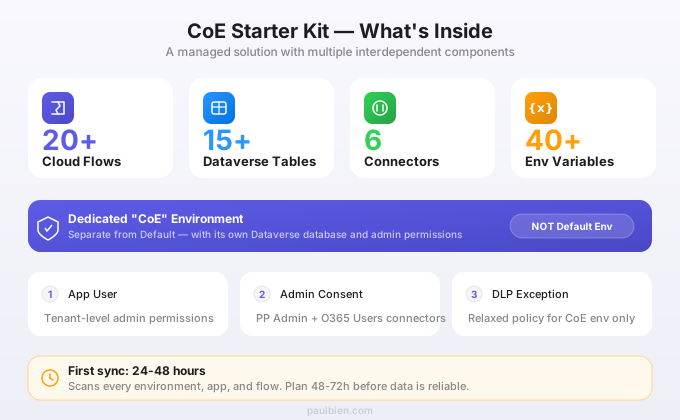
What trips up most organizations:
- Environment selection matters. Deploy it in a dedicated "CoE" environment, not in Default. The Default environment has lax DLP policies, shared connectors, and thousands of resources competing for capacity. One organization deployed CoE in Default and the inventory flows timed out after three days because the environment already had 4,000 flows running.
- The Admin connectors need explicit consent. The Power Platform for Admins and Office 365 Users connectors require admin-level API permissions. In organizations with Conditional Access policies, this consent process involves security reviews that can take weeks.
- Syncing is slow on first run. The initial inventory sync scans every environment, every app, every flow. For a tenant with 50+ environments, expect the first full sync to take 24-48 hours. The flows run on schedules, not in real-time.
DLP Policies Will Block Your Flows
This is the single most common deployment failure. The CoE Kit's cloud flows use connectors that span business and non-business categories. If your tenant has strict DLP policies (and it should), those policies will block CoE flows from running.
The typical failure: the inventory sync flow uses both the Dataverse connector (business) and the HTTP connector (non-business). A DLP policy that separates these into different groups kills the flow at runtime.
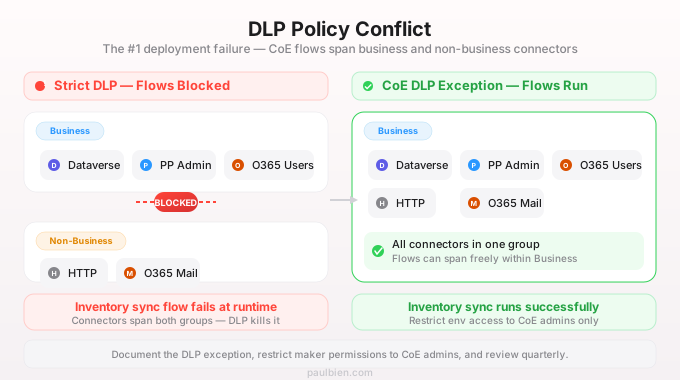
The fix: Create a DLP policy exception for the CoE environment. This is a dedicated admin environment, not a maker sandbox. It needs broader connector access than standard environments.
CoE Environment DLP Policy:
  Business: Dataverse, Power Platform for Admins,
            Office 365 Users, HTTP, Office 365 Outlook
  Non-Business: Everything else
  Blocked: None (admin environment)
The tradeoff is real: you are relaxing DLP for one environment to make governance work. Document the exception, restrict environment maker permissions to CoE admins only, and review quarterly.
The Compliance Module Is Enterprise-Critical but Underdocumented
The Compliance module sends automated emails to app and flow owners asking them to justify their resources. Owners who do not respond within a configurable period get flagged for cleanup.
What the documentation undersells:
- Email templates need customization. The default emails are generic Microsoft templates. At a financial services company, the default English-only emails were ignored by 60% of makers. Localizing the templates and adding the company logo increased response rates to 85%.
- The escalation logic is basic. If a maker does not respond, the flow flags the resource but does not take action. You need to build the actual cleanup process: notify the maker's manager, archive the app, or disable the flow. The Kit gives you the data, not the enforcement.
- Orphaned resources pile up. When employees leave the organization, their apps and flows become orphaned. The CoE Kit detects this, but the volume surprises everyone. A typical enterprise with 2,000 makers will have 300-500 orphaned resources within the first year of Power Platform adoption.
Customization: Where the Real Value Lives
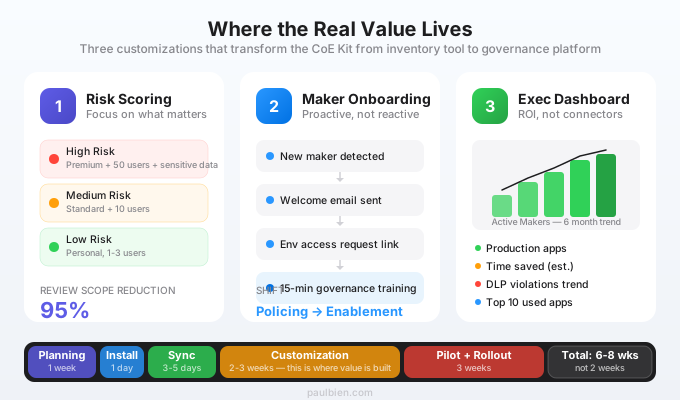
The CoE Kit out-of-the-box is a starting point. The organizations that get real value customize three things:
1. Custom Risk Scoring
The default inventory tracks apps and flows but does not assess risk. Add a calculated column to the PowerApps App table:
- High risk: Uses premium connectors + has 50+ active users + accesses sensitive Dataverse tables
- Medium risk: Uses standard connectors + has 10+ active users
- Low risk: Personal productivity apps with 1-3 users
This lets governance teams focus reviews on the 5% of apps that matter instead of drowning in the full catalog.
2. Maker Onboarding Automation
Connect the CoE Kit's maker inventory to an onboarding flow:
- New maker detected (first app or flow created)
- Automated welcome email with governance guidelines
- Link to request access to non-Default environments
- Mandatory completion of a 15-minute Power Platform governance training
This shifts governance from reactive policing to proactive enablement. Makers who understand the rules upfront create fewer compliance issues.
3. Executive Dashboard
The CoE Kit ships with a Power BI dashboard, but it is designed for Platform admins, not executives. Build a separate one-page report for leadership:
- Total active makers (trend over 6 months)
- Apps in production vs. apps abandoned
- Time saved (estimated, from maker self-reports via the compliance module)
- Top 10 most-used apps
- DLP violations trend
Executives do not care about connector inventories. They care about ROI and risk.
The Upgrade Problem
Microsoft updates the CoE Kit quarterly. Each update requires importing a new version of the managed solution. This frequently causes:
- Flow connection failures. Updated flows lose their connection references. Plan for 30-60 minutes of reconfiguration after each upgrade.
- Environment variable resets. Some updates reset environment variables to defaults. Document all custom values before upgrading.
- Breaking changes. The Kit's changelog occasionally lists breaking changes buried in minor version notes. Read every line.
Best practice: Maintain a "CoE Upgrade Runbook" that documents your custom environment variables, DLP policy exceptions, connection references, and any custom columns or flows. Update it every quarter, and test upgrades in a dev CoE environment before touching production.
Realistic Deployment Timeline
Organizations that plan for two weeks end up spending two months. Here is what a realistic CoE Kit deployment looks like:
| Phase | Duration | Activities |
|---|---|---|
| Planning | 1 week | Environment setup, DLP review, admin consent |
| Installation | 1 day | Solution import, environment variables, connections |
| Initial Sync | 3-5 days | First full inventory, data validation |
| Customization | 2-3 weeks | Risk scoring, email templates, dashboards |
| Pilot | 2 weeks | Run compliance flows with a subset of makers |
| Rollout | 1 week | Enable for all environments, notify makers |
| Total | 6-8 weeks |
The CoE Starter Kit is the best free governance tool for Power Platform. But "free" does not mean "zero effort." Treat it as a platform project, staff it accordingly, and customize it for your organization. The alternative, ungoverned citizen development, is significantly more expensive.