Power Apps
Code Apps in Production: CSP, ALM, and Hard-Won Lessons
What you need to know before shipping a Code App to production - Content Security Policy, deployment pipelines, Dataverse quirks, and a pre-deploy checklist.
Building a Code App locally is straightforward. Getting it into production, and keeping it running reliably, is where the real lessons happen. This article covers the production concerns that official documentation glosses over.
CSP: The January 2026 enforcement
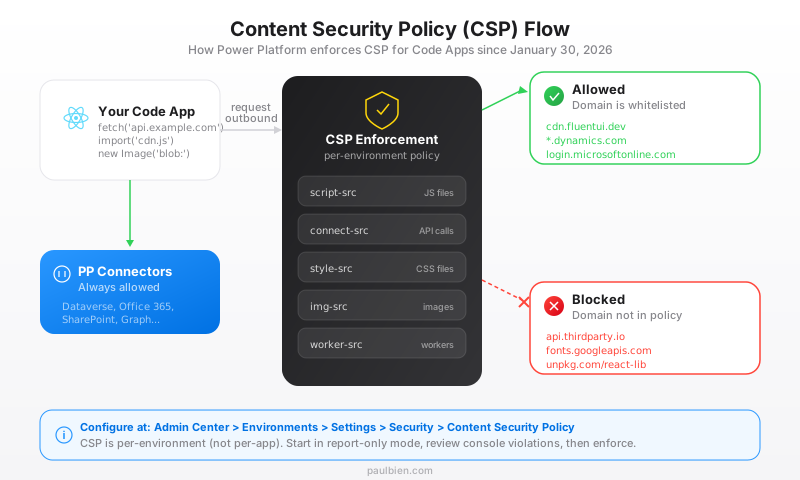
On January 30, 2026, Microsoft activated Content Security Policy enforcement for Code Apps. Every request to an external domain that is not explicitly whitelisted is now blocked by default.
This hit many teams hard. If your app loads fonts from a CDN, calls a third-party API, uses a JavaScript SDK, or even renders blob images, it might break in production without CSP configuration.
How to configure CSP
Navigate to Admin Center > Environments > Settings > Security > Content Security Policy.
Common directives you will need to update:
| Issue | Directive to modify |
|---|---|
| Third-party JS blocked | script-src: add the CDN domain |
| External CSS blocked | style-src: add the CSS source |
| WebSocket connections denied | connect-src: add wss:// URL |
| External auth service blocked | connect-src: add auth domains |
| Blob images not rendering | img-src: add data: and blob: |
| Web Workers failing | worker-src: add blob: |
CSP testing strategy
- Deploy to a development environment first
- Enable report-only mode in CSP settings
- Open browser DevTools > Console and look for CSP violation messages
- Add each blocked domain to the appropriate directive
- Test thoroughly, then switch to enforcement
- Repeat in QA before promoting to production
ALM: The connection reference pattern
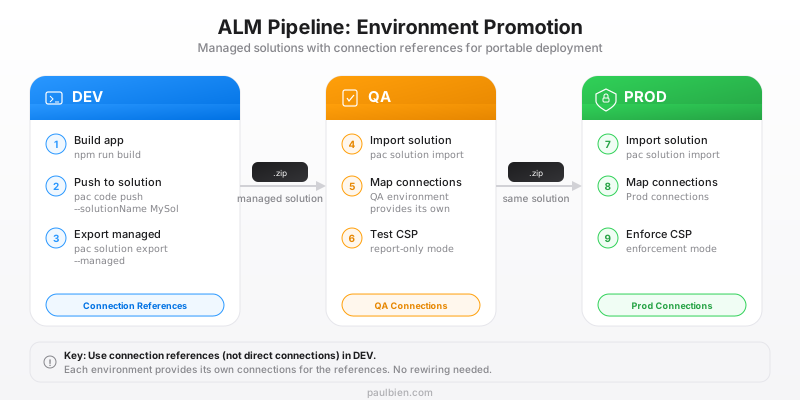
The biggest ALM mistake is binding Code Apps to user-specific connections during development. These connections do not transfer across environments.
The correct pattern
Use connection references instead of direct connections:
# During development setup
pac code add-data-source \
  --apiId shared_commondataservice \
  --connectionRef <connection-ref-id> \
  --solutionId <solution-id>
Connection references are solution components. When you export a managed solution from DEV and import it into QA, the target environment provides its own connections for each reference. No manual rewiring required.
The deployment pipeline
DEV:  pac code push --solutionName MySolution
      pac solution export --name MySolution --path ./export --managed

QA:   pac solution import --path ./export/MySolution_managed.zip
      (Configure connection ref mappings if first import)

PROD: Same managed solution, same process
Dataverse quirks to know
Null org URL on connections
This is the most common production issue. Connections created by pac code add-data-source often have a null organization URL, causing standard service methods to return empty results silently.
Always use the WithOrganization method variants:
// WRONG — may return empty results
MicrosoftDataverseService.ListRecords('accounts', ...);

// CORRECT — explicitly passes the org URL
MicrosoftDataverseService.ListRecordsWithOrganization(
  'https://your-org.crm.dynamics.com',
  'accounts',
  ...
);
Create returns void
CreateRecordWithOrganization returns void. You cannot read the new record's ID from the response. Use a query-after-create pattern with retries to account for Dataverse's replication delay (~500ms):
async function retryFind<T>(
  fn: () => Promise<T>,
  maxRetries = 3,
  delayMs = 500
): Promise<T> {
  for (let i = 0; i < maxRetries; i++) {
    if (i > 0) await new Promise(r => setTimeout(r, delayMs));
    const result = await fn();
    if (result) return result;
  }
  return fn();
}
Invalid identifiers in generated code
The code generator may produce TypeScript identifiers with dots (e.g., MSCRM.IncludeMipSensitivityLabel), which are not valid TypeScript. Fix by replacing dots with underscores in the generated file.
Pre-deploy checklist
Before every production deployment:
-
npm run buildcompletes with zero errors - No
console.logstatements in production code -
WithOrganizationused for all Dataverse calls - Connection references (not direct connections) for all data sources
- CSP: all external domains whitelisted in the target environment
- Bundle size < 500KB gzip (use code splitting with
React.lazy) - Dark and light themes tested (if applicable)
- Keyboard navigation works for all interactive elements
- Error boundaries on critical components
- Tested with a non-admin user account
- Responsive layout verified (desktop + tablet minimum)
- React version is 18.x or 19.x (both supported)
The bottom line
Code Apps in production are reliable once you know the gotchas: CSP configuration, connection references for ALM, and the WithOrganization pattern for Dataverse. The platform handles auth, hosting, and governance: your job is to get the data layer right and keep the bundle lean.
For the full technical reference, read:
The Complete Guide to Power Apps Code Apps
Sources
- Configure CSP for Code Apps - Microsoft Learn
- ALM Guide for Code Apps - Microsoft Learn
- Power Apps Code App with Dataverse: Building CRUD Operations - Rajeev Pentyala
- Retrieve Dataverse Records in Power Apps Code App - Alphavima
- Code Apps Office Hours Highlights - Tim Leung, Power Apps Guide