Power Apps
Code Apps + Governance: Why IT Will Love Them
Code Apps deployed with pac code push become governed Dataverse components - with DLP, pipelines, managed environments, and security roles. Here's why IT admins should pay attention.
Code Apps let developers build full React/TypeScript applications inside Power Platform. That part is well understood. What is less discussed, and arguably more important for enterprise adoption, is what happens after deployment.
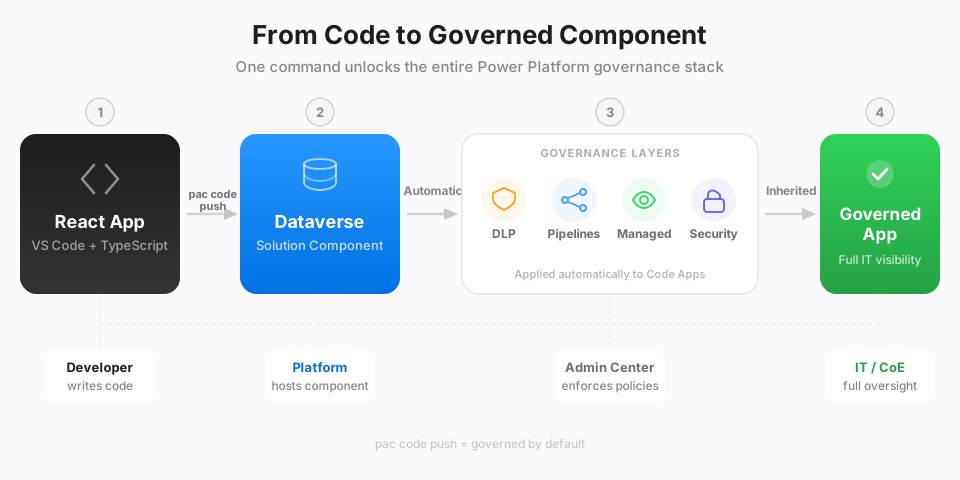
When a Code App is pushed with pac code push, it becomes a standard Dataverse component inside a solution. From that moment, every governance mechanism that applies to Canvas Apps and Model-Driven Apps applies to Code Apps too.
This is the feature that turns Code Apps from a developer convenience into an IT-approved delivery channel.
The governance problem with custom code
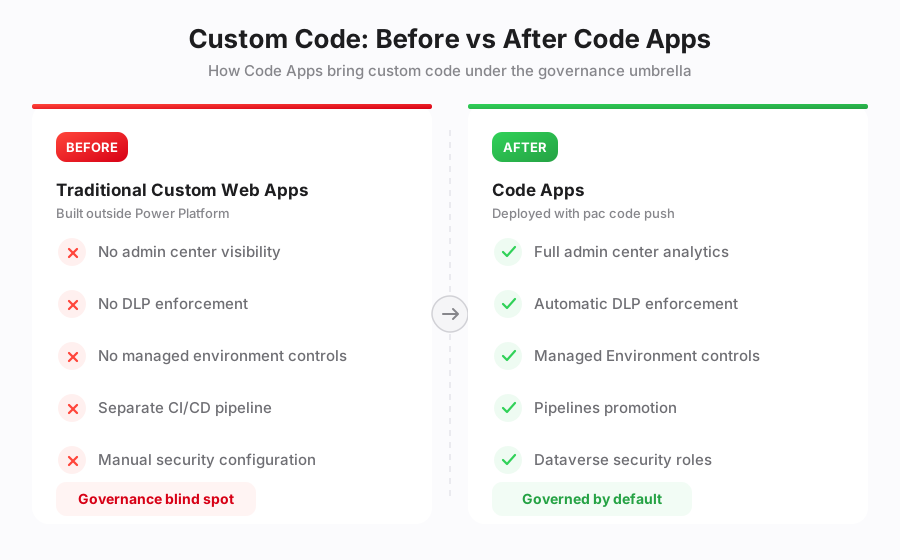
Before Code Apps, organizations that needed custom web applications had limited options within Power Platform. Developers would build standalone SPAs hosted on Azure, SharePoint, or third-party infrastructure. These apps lived outside the Power Platform governance perimeter:
- No visibility in the Power Platform admin center
- No DLP policy enforcement
- No managed environment controls
- No standardized promotion pipeline
- No Dataverse security role integration
IT teams had no unified way to track, secure, or manage these applications alongside low-code assets. Custom code was effectively a governance blind spot.
How Code Apps change this
The key insight is simple: pac code push deploys the application into Dataverse, not alongside it. The Code App becomes a solution component: the same type of artifact as a Canvas App, a cloud flow, or a custom connector.
This single design decision unlocks the entire Power Platform governance stack.
Solutions and ALM
A Code App lives inside a Dataverse solution. It can be:
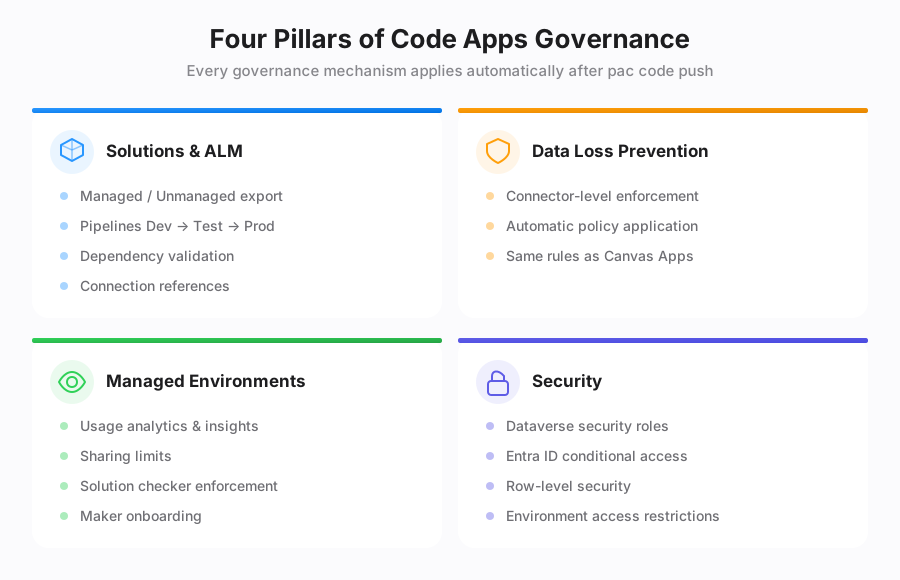
- Exported as managed or unmanaged
- Promoted through Dev, Test, and Production environments using Pipelines
- Subject to dependency validation and connection reference management
- Versioned alongside other solution components
# Deploy to the preferred solution
pac code push

# Deploy to a specific solution
pac code push --solutionName "ContosoGovernance"
The deployment target is explicit. No more applications landing in the default environment with no traceability.
Data Loss Prevention (DLP)
DLP policies apply to the connectors used by the Code App. If a policy blocks combining SharePoint and Twitter connectors, that rule applies regardless of whether the app is a Canvas App or a Code App.
This is automatic. The Code App does not need any special configuration: DLP enforcement happens at the connector layer, which Code Apps use just like any other Power Platform application.
Managed Environments
When the target environment is a Managed Environment, Code Apps inherit all associated controls:
- Admin insights: usage analytics, active users, last launch date
- Sharing limits: restrictions on how broadly the app can be shared
- Solution checker enforcement: mandatory validation before import
- Maker welcome content: onboarding messages for developers
Managed Environments give IT a single pane of glass. Code Apps show up in that pane alongside everything else.
Security
Code Apps respect the same security model as all Power Platform applications:
- Dataverse security roles control data access
- Entra ID conditional access policies apply to the Power Apps host
- Environment-level access restrictions determine who can run the app
- Row-level security in Dataverse works identically
There is no separate security model to configure. A Code App deployed to a governed environment inherits the environment's security posture.
What this means in practice
Consider a typical enterprise scenario. A development team builds a React application that reads from Dynamics 365 and writes to SharePoint.
Before Code Apps, this required:
- A standalone web app hosted on Azure App Service
- An Azure AD app registration for authentication
- Manual DLP compliance checks
- A separate CI/CD pipeline
- Custom monitoring and usage tracking
With Code Apps, the same application:
- Is deployed with
pac code pushinto a managed solution - Uses Power Platform authentication: zero auth code
- Is automatically subject to DLP policies
- Can be promoted through Pipelines with dependency checks
- Shows up in the Power Platform admin center with full analytics
Current limitations
Two notable gaps remain:
- No Solution Packager support: Code Apps cannot be decomposed into individual XML files for granular source control. The component is treated as a single artifact.
- No source code integration from the portal: There is no link from the Power Apps portal back to a Git repository. Source code management remains the developer's responsibility.
These are expected to improve as the feature matures, but they are worth noting for teams that rely heavily on Solution Packager workflows.
The bottom line
Code Apps solve a problem that has existed since Power Platform's early days: how to let developers write real code without creating governance blind spots.
The answer is deceptively simple: deploy the code into Dataverse and let the existing governance stack do its job. DLP, Pipelines, Managed Environments, security roles: they all work because a Code App is, from the platform's perspective, just another solution component.
For IT teams evaluating Code Apps, the message is clear: this is not a developer escape hatch. It is a governed delivery channel that happens to support React and TypeScript.
References: