Governance
Agent 365: Microsoft's Control Plane for AI Agents - And Why Governance Can't Wait
Microsoft Agent 365 introduces a unified control plane for AI agents across Microsoft 365. With agents now getting their own Entra identities, a Top 10 security risks list, and two separate admin planes to coordinate - governance just became the real challenge.
At Microsoft Ignite in November 2025, Satya Nadella framed the near future as the era of the "Frontier Firm": organizations where AI agents work alongside humans as digital labor. The governance infrastructure for that vision shipped the same day: Microsoft Agent 365.
Agent 365 is the control plane for AI agents across the Microsoft 365 ecosystem. It provides a registry, access control, monitoring, and security integration for every agent in a tenant, whether built by Microsoft, by partners, or by internal teams.
Four months in, the picture is becoming clearer. Agents are shipping faster than governance policies. The tooling exists but is spread across multiple admin surfaces. And the biggest risk isn't the agents themselves: it's the data permissions they inherit.
What Agent 365 actually is
Agent 365 is not a product to buy or a license to assign. It is a governance framework built into the Microsoft 365 admin center, providing five capabilities:
| Capability | What it does |
|---|---|
| Registry | Single inventory of all agents in the tenant: first-party, partner, and custom-built |
| Access Control | Risk-based conditional access policies for agents via Microsoft Entra |
| Visualization | Dashboard showing connections between agents, people, and data |
| Interoperability | Standardized interfaces for agents to work with apps and data |
| Security | Integration with Microsoft Defender, Entra, and Purview |
Agent 365 is currently in Public Preview, available through Microsoft's Frontier early access program. It complements, but does not replace, the Copilot Control System (CCS) that handles day-to-day agent management.
The agent taxonomy
Not all agents are equal in terms of risk or governance requirements.
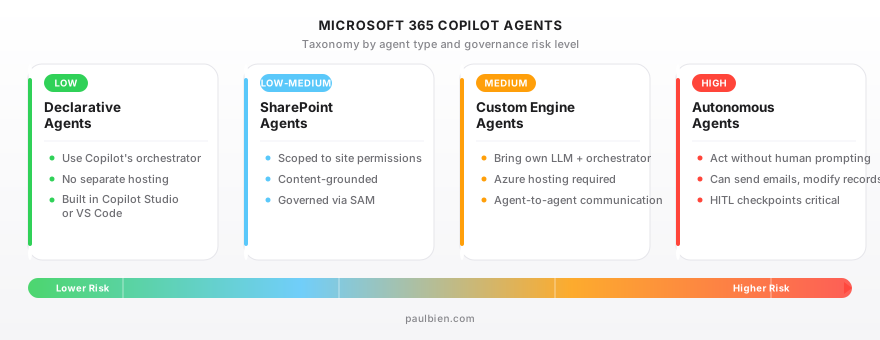
Declarative Agents layer custom instructions, knowledge sources, and actions on top of Microsoft 365 Copilot. They run entirely within Copilot's trust boundary: no separate hosting, no custom model. Built in Copilot Studio or VS Code with the M365 Agents Toolkit. Lowest governance overhead.
Custom Engine Agents bring their own orchestrator and language model. They require Azure hosting and can run across M365, Teams, external apps, and websites. They support agent-to-agent communication. Higher governance requirements: they operate partially outside the Copilot trust boundary.
Autonomous Agents perform multi-step tasks without continuous human prompting. Built in Copilot Studio using Agent Flows. Highest risk category: they can take actions, send emails, modify records. Human-in-the-Loop (HITL) checkpoints are critical here.
SharePoint Agents are scoped to a specific SharePoint site or document library. They use that content as their knowledge base and respect existing permissions. Governed through SharePoint Advanced Management (SAM).
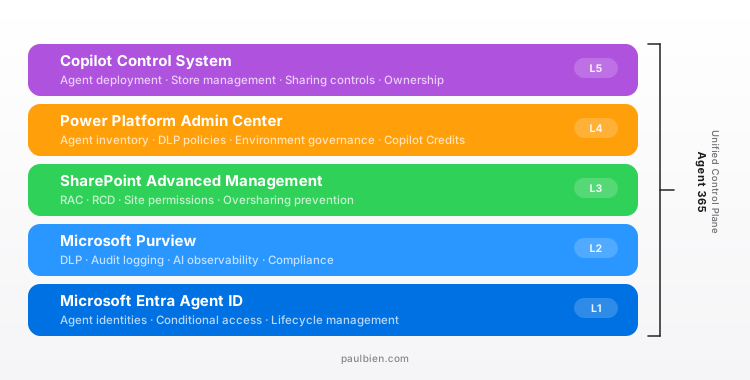
The governance stack: five layers, three admin surfaces
This is where it gets complicated. Agent governance is not centralized. It spans three separate admin surfaces, and IT teams need to coordinate across all of them.
Layer 1: Microsoft Entra Agent ID (Preview)
Every AI agent gets a unique identity in Microsoft Entra, analogous to a user account or service principal. This enables:
- Conditional Access policies applied to agents
- Least-privilege access modeling
- Lifecycle management: creation, credential rotation, decommissioning
- Distinction between production, development, and test agent identities
Think of it as Zero Trust applied to non-human identities. When an employee leaves and their agent persists with embedded credentials, Entra Agent ID is what prevents that from becoming a security incident.
Layer 2: Microsoft Purview
Purview is the compliance backbone. Key capabilities for agents:
- DLP for Copilot: prevents agents from processing prompts containing sensitive information types or summarizing files with specific sensitivity labels
- AI Observability: identifies risky agent behavior in real time and assigns risk levels
- Audit Logging: captures prompts, responses, files accessed, and user identity in the Unified Audit Log
- Communication Compliance: policies for detecting and investigating problematic agent interactions
Layer 3: SharePoint Advanced Management (SAM)
SAM addresses the root cause of most Copilot data incidents: oversharing. It is included with the M365 Copilot license.
- Restricted Access Control (RAC): requires users to be in a designated Entra security group to access a SharePoint site, regardless of conventional ACL permissions
- Restricted Content Discovery (RCD): blocks overshared sites from being discoverable by Copilot and agents
- Site Permissions Report: scans all sites and identifies those with the most permissioned users
Research suggests M365 Copilot interacts with approximately 3 million confidential records per organization on average. SAM is what prevents agents from surfacing content that was technically accessible but never meant to be found.
Layer 4: Power Platform Admin Center
For Copilot Studio agents specifically:
- Tenant-wide agent inventory
- Enable/disable generative AI features per tenant
- DLP policies scoped to connectors and data sources
- Environment-level governance (dev vs prod separation)
- Agent spend oversight via Copilot Credits
Layer 5: Copilot Control System (M365 Admin Center)
The day-to-day management interface:
- Enable/disable agents per user group or org-wide
- Deploy agents from the Agent Store to specific groups
- Control agent sharing scope
- Agent ownership reassignment (GA since Ignite 2025)
- CSV export of full agent inventory
The two-admin-plane problem
Here's the governance gap that organizations are discovering in practice: the Power Platform admin and the M365 admin are governing different parts of the same agent ecosystem.
A Copilot Studio agent is built and configured under Power Platform governance. But when that agent is published to M365 Copilot and accessed through Teams or SharePoint, it falls under CCS governance. Two admin surfaces, two sets of policies, two teams that may not be coordinating.
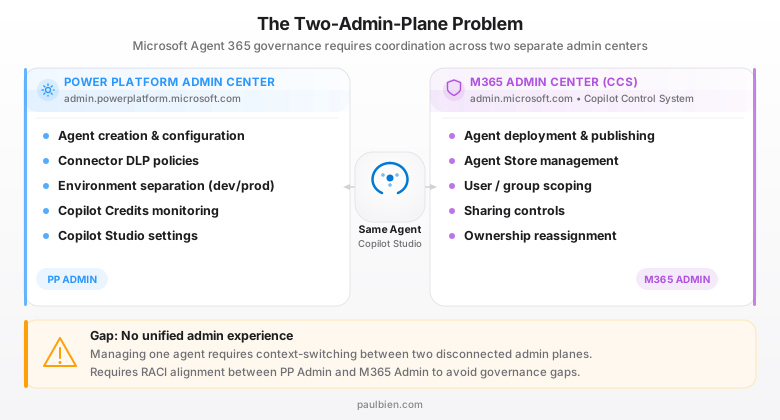
The practical implication: an agent can be properly governed at the Power Platform level (right connectors, right DLP policies, right environment) but improperly exposed at the M365 level (published to "Everyone" instead of a scoped security group). Or vice versa.
The fix is organizational, not technical. Define a RACI between the two admin roles. Determine who approves agent publication, who reviews access scope, and who monitors post-deployment behavior.
The Top 10 agent security risks
In February 2026, Microsoft published the Copilot Studio Agent Security Top 10: a list of the most common misconfigurations, with KQL queries for Microsoft Defender to detect each one.
The five most impactful:
- Overly broad sharing: Agents published to the entire organization instead of scoped security groups
- Missing authentication: Agents using "No authentication" mode in production
- Direct HTTP requests: Agents calling arbitrary external endpoints, bypassing governance
- Uncontrolled email actions: Agents configured to send email externally without audit
- Maker authentication: Agents using the builder's own credentials instead of delegated or service-based auth
The remaining five cover dormant agents, excessive data access, prompt injection vulnerabilities, insecure connectors, and unreviewed third-party integrations.
Licensing for agents
Agent licensing has its own complexity.
Microsoft 365 Copilot (~$30/user/month) includes Agent Builder in Copilot Chat, Copilot Studio Lite, and standard agent usage. SharePoint Advanced Management is included.
Copilot Credits are the billing unit for Copilot Studio agents (since September 2025, replacing the old "messages" model). Credits are consumed when agents access tenant data, execute agent flows, or perform generative orchestration.
- Prepaid: $200/month for 25,000 credits
- Pay-as-you-go: via Azure subscription
- Pre-Purchase Plan: one-year upfront with volume discounts
Key nuance: when a Copilot Studio agent accesses SharePoint, Graph, or Dataverse content, it consumes Copilot Credits even for M365 Copilot-licensed users. The "included" tier covers basic generative answers from web content, not tenant-grounded responses.
What's still in preview
- Agent 365 itself: Public Preview via Frontier early access
- Entra Agent ID: Preview, not yet GA
- Human-in-the-Loop: Preview, targeting GA in 2026
- Shadow agent detection in the Agent 365 Registry: not yet available
- Unified admin experience bridging PP Admin Center and M365 Admin Center: not announced
Action items for IT teams
- Run SAM site permissions report first. Fix oversharing before enabling agents: this is the single highest-impact governance action.
- Configure Purview DLP for Copilot. Block summarization of labeled content. Start in report-only mode.
- Establish agent identity policy. Require Entra Agent ID registration for all production agents. No exceptions.
- Ban "No authentication" and "Maker authentication" in production. Enforce Entra ID authentication via DLP policy.
- Define the RACI. Document who owns agent creation governance (PP admin) vs deployment governance (M365 admin) vs compliance monitoring (security team).
- Review against the Top 10 checklist. Make it a mandatory gate before any agent goes to production.
- Scope agent publication. Default to restricted, then whitelist via Entra security groups. Never publish to "Everyone" without explicit justification.
- Monitor Copilot Credits consumption. Set budget alerts in the Power Platform admin center to prevent runaway agent costs.
Sources:
- Microsoft Agent 365: The control plane for AI agents - Microsoft 365 Blog
- Copilot Control System Security and Governance - Microsoft Learn
- Microsoft Entra Agent ID - Microsoft Learn
- Microsoft Purview for Agent 365 - Microsoft Learn
- Copilot Studio Agent Security Top 10 - Microsoft Security Blog
- Evolving Power Platform Governance for AI Agents - Microsoft
- SharePoint Advanced Management for Copilot readiness - Microsoft Learn
- Governance and security for AI agents - Cloud Adoption Framework - Microsoft Learn